
Introduction:
Here I will explain how to create a survey
in SharePoint 2010 or create new survey in SharePoint site in 2010.
Description:
In previous post I explained Uses of SharePoint, Create new group in SharePoint, Add users to SharePoint Group, Add Users to SharePoint Site, SharePoint Browsers Compatibility and Allow Anonymous access to SharePoint site. Now I will explain how to create site
in SharePoint 2010.
To create new survey in SharePoint
site in 2010 we need to follow below steps
1. Login to your SharePoint site as the administrative
account.
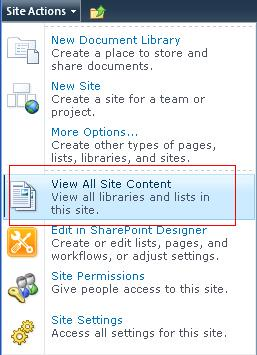
3. Once you open Site Content now click on Create

4. Once click on create we will see lot of options
in that select Survey from List section, once you select survey
we can get textbox to create new survey in right side in that enter name and click create

5. In the next screen it will ask you to fill your
question and choices after that click finish button


|
If you enjoyed this post, please support the blog below. It's FREE! Get the latest Asp.net, C#.net, VB.NET, jQuery, Plugins & Code Snippets for FREE by subscribing to our Facebook, Twitter, RSS feed, or by email. |
|||
 Subscribe by RSS
 Subscribe by Email
|
|||


3 comments :
thanks
123
Thanks
Note: Only a member of this blog may post a comment.