
Introduction:
In this article I will explain how to highlight or change background and border color of form controls when validation fails in asp.net using JQuery.

In this article I will explain how to highlight or change background and border color of form controls when validation fails in asp.net using JQuery.
Description:
In previous articles I explained about Display validation error messages with images and Change textbox background when validation fails and Ajax Password Strength using asp.net . Now I will explain how to highlight form controls when validation fails using JQuery in asp.net.
In one of the website I saw different type of form validations in registration form when we click on submit button without entering any data they are highlighting controls and changing the background color of controls. We can implement this functionality easily by using available JQuery plugins.
In previous articles I explained about Display validation error messages with images and Change textbox background when validation fails and Ajax Password Strength using asp.net . Now I will explain how to highlight form controls when validation fails using JQuery in asp.net.
In one of the website I saw different type of form validations in registration form when we click on submit button without entering any data they are highlighting controls and changing the background color of controls. We can implement this functionality easily by using available JQuery plugins.
First open Visual Studio and create new website after that right click on your website and add new folder and give name as JS and insert script files in folder you should get it from attached folder. After that write the following code in your aspx page
<html xmlns="http://www.w3.org/1999/xhtml" xml:lang="en" lang="en"> <head> <title>Highlight page controls when validation fails in asp.net</title> <script src="JS/jquery.js" type="text/javascript"></script> <script src="JS/jquery.validate.js" type="text/javascript"></script> <script type="text/javascript" src="JS/jquery.maskedinput.js"></script> <script type="text/javascript" src="JS/mktSignup.js"></script> <link rel="stylesheet" type="text/css" media="screen" href="stylesheet.css" /> </head> <body> <div> <form runat="server" > <table cellpadding="0" cellspacing="0" border="0" align="center"> <h2>Billing Information</h2> <tr class="subTable"> <td colspan="2"> <div style="background-color: #EEEEEE; border: 1px solid #CCCCCC; padding: 10px;" class="subTableDiv"> <table cellpadding="0" cellspacing="0" border="0"> <tr> <td class="label">First Name:</td> <td class="field"><asp:TextBox ID="firstname" CssClass="ValidationRequired" runat="server"/></td> </tr> <tr> <td class="label">Last Name:</td> <td class="field"><asp:TextBox ID="lastname" CssClass="ValidationRequired" runat="server"/></td> </tr> <tr> <td class="label">Email:</td> <td class="field"><asp:TextBox ID="email" runat="server" CssClass="ValidationRequired email"/> <div class="formError"></div> </td> </tr> <tr> <td class="label">Address:</td> <td class="field"><asp:TextBox ID="bill_address1" runat="server" CssClass="ValidationRequired"/></td> </tr> <tr> <td class="label"></td> <td class="field"><asp:TextBox ID="bill_address2" runat="server" CssClass="ValidationRequired"/></td> </tr> <tr> <td class="label">City:</td> <td class="field"><asp:TextBox ID="bill_city" runat="server" CssClass="ValidationRequired"/></td> </tr> <tr> <td class="label">State:</td> <td class="field"> <asp:DropDownList ID="ddlState" runat="server" CssClass="ValidationRequired"> <asp:ListItem value="">Choose State</asp:ListItem> <asp:ListItem Value="AL">Alabama</asp:ListItem> <asp:ListItem value="AK">Alaska</asp:ListItem> <asp:ListItem value="AL">Alabama </asp:ListItem> <asp:ListItem value="AK">Alaska</asp:ListItem> <asp:ListItem value="AZ">Arizona</asp:ListItem> <asp:ListItem value="AR">Arkansas</asp:ListItem> <asp:ListItem value="CA">California</asp:ListItem> <asp:ListItem value="CO">Colorado</asp:ListItem> <asp:ListItem value="CT">Connecticut</asp:ListItem> <asp:ListItem value="DE">Delaware</asp:ListItem> <asp:ListItem value="FL">Florida</asp:ListItem> <asp:ListItem value="GA">Georgia</asp:ListItem> <asp:ListItem value="HI">Hawaii</asp:ListItem> <asp:ListItem value="ID">Idaho</asp:ListItem> </asp:DropDownList> </td> </tr> <tr> <td class="label">Zip:</td> <td class="field"> <asp:TextBox ID="txtZip" runat="server" CssClass="ValidationRequired zipcode"/> </td> </tr> <tr> <td class="label">Phone:</td> <td class="field"> <asp:TextBox ID="txtPhone" runat="server" CssClass="ValidationRequired phone"/> </td> </tr> <tr> <td class="label">Credit Card Type:</td> <td class="field"> <asp:DropDownList ID="ddlCardType" runat="server" CssClass="ValidationRequired"> <asp:ListItem Value="">Choose Credit Card</asp:ListItem> <asp:ListItem value="amex">American Express</asp:ListItem> <asp:ListItem value="discover">Discover</asp:ListItem> <asp:ListItem value="mastercard">MasterCard</asp:ListItem> <asp:ListItem value="visa">Visa</asp:ListItem> </asp:DropDownList> </td> </tr> <tr> <td class="label">Expiration:</td> <td class="field"> <asp:DropDownList ID="ddlExpMonth" runat="server"> <asp:ListItem value="01">Jan</asp:ListItem> <asp:ListItem value="02">Feb</asp:ListItem> <asp:ListItem value="03">Mar</asp:ListItem> <asp:ListItem value="04">Apr</asp:ListItem> <asp:ListItem value="05">May</asp:ListItem> <asp:ListItem value="06">Jun</asp:ListItem> <asp:ListItem value="07">Jul</asp:ListItem> <asp:ListItem value="08">Aug</asp:ListItem> <asp:ListItem value="09">Sep</asp:ListItem> <asp:ListItem value="10">Oct</asp:ListItem> <asp:ListItem value="11">Nov</asp:ListItem> <asp:ListItem value="12">Dec</asp:ListItem> </asp:DropDownList> <asp:DropDownList ID="ddlExpYear" runat="server"> <asp:ListItem value="2007">2007</asp:ListItem> <asp:ListItem value="2008" Selected="True">2008</asp:ListItem> <asp:ListItem value="2009">2009</asp:ListItem> <asp:ListItem value="2010">2010</asp:ListItem> <asp:ListItem value="2011">2011</asp:ListItem> <asp:ListItem value="2012">2012</asp:ListItem> <asp:ListItem value="2013">2013</asp:ListItem> <asp:ListItem value="2014">2014</asp:ListItem> <asp:ListItem value="2015">2015</asp:ListItem> <asp:ListItem value="2016">2016</asp:ListItem> </asp:DropDownList> </td> </tr> <tr> <td class="label">Credit Card Number:</td> <td class="field"> <asp:TextBox ID="creditcard" runat="server" CssClass="ValidationRequired" MaxLength="40"/> </td> </tr> <tr> <td class="label"><label for="cc_cvv">Security Code:</label></td> <td class="field"> <asp:TextBox ID="txtccNumber" runat="server" CssClass="ValidationRequired" MaxLength="4" style="width: 30px;"/> </td> </tr> <tr> <td></td> <td> <div class="buttonSubmit"> <span></span> <asp:Button ID="btnSubmit" runat="server" Text="Submit" CssClass="formButton" onclick="btnSubmit_Click" /> </div><br clear="all"/> </td> </tr> <tr> <td colspan="2"> <asp:Label ID="lblResult" runat="server" Font-Bold="true"/></td> </tr> </table> </div> </td> </tr> </table> <div> </div> </form> </div> </body> </html> |
If you observe above code in header section I added some of script files and css files by using those files we have a chance to highlight controls when validation fails using JQuery in asp.net. Here one thing we need to remember that is if we want add validation for particular control then we need to add css class CssClass="ValidationRequired" to that particular control.
Now add following code in code behind
protected void btnSubmit_Click(object sender, EventArgs e) { lblResult.Visible = true; lblResult.Text = "Successfully Validated all the controls"; lblResult.ForeColor = Color.Green; } |
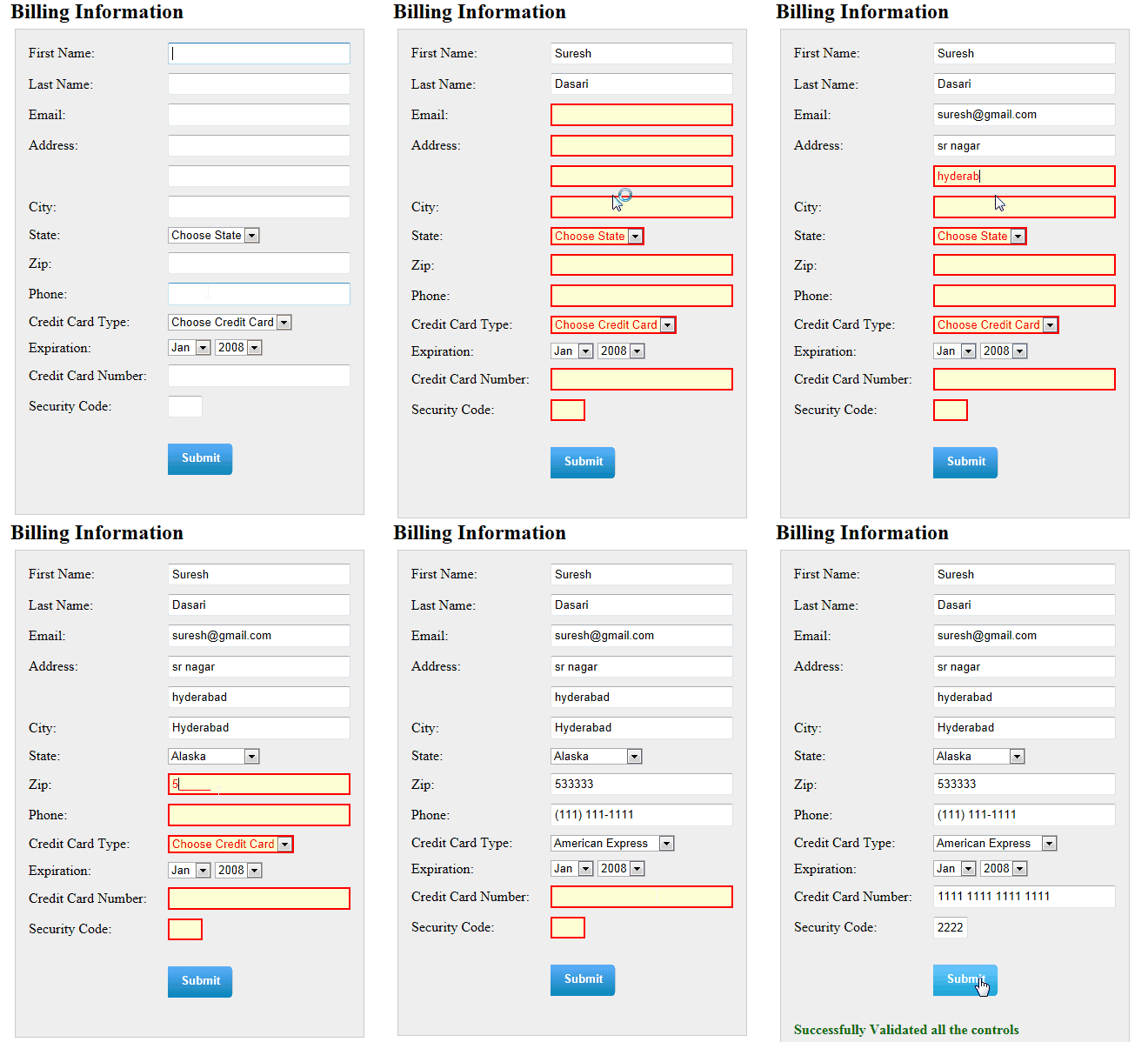
After run your application and check the output.
Demo
 |
Download sample code attached

Here we can customize the script files based on our requirement if you observe above demo in that ZiP Code , Phone Number and Credit Card Number fields are allowing only numbers in particular format based on our settings in our script file.
To know more about this JQuery plugin check these sites bassistance.de and JQuery tooltip demo page jquery.bassistance.de
To know more about this JQuery plugin check these sites bassistance.de and JQuery tooltip demo page jquery.bassistance.de

|
If you enjoyed this post, please support the blog below. It's FREE! Get the latest Asp.net, C#.net, VB.NET, jQuery, Plugins & Code Snippets for FREE by subscribing to our Facebook, Twitter, RSS feed, or by email. |
|||
 Subscribe by RSS
 Subscribe by Email
|
|||


11 comments :
Hi, this is very useful. Thx.
But :-) when I have more how one button on page. So they validation page too. How can i create CausesValidation="false"??? Is is possible?
thank for answer
P.
hello,
is it possible to render in red the labels too?
L
thank you dude...its save my time
What about RadioButton?
Hi, how to create the following files
JS/jquery.validate.js
JS/jquery.maskedinput.js
JS/mktSignup.js
How to get validation error messages next to controls instead of in validation summary.
Wat about radiobutton list,check box list,
Really it's a useful site jii...good job.....
i can not say something ...but it's the more and more helpful site....thanks sir..
Hai...This is chandrakanth...its very useful site...Thanks
Hello..I want to Know How to Select multiple rows in gridview in ASP.NET by Using CheckBoxes.
Note: Only a member of this blog may post a comment.