
Introduction:
Here I will explain how to export gridview data to PDF using asp.net.
Here don’t forgot to set the connection string in web.config file here I am getting database connection from web.config file for that reason you need to set the connectionstring in web.config file like this

Now if you’re getting any error message like
Here I will explain how to export gridview data to PDF using asp.net.
Description:
In my previous articles I explained clearly how to export gridview data to excel or word and how to export gridview data to CSV file . Now I will explain how to export gridview data to PDF using asp.net. In asp.net we don’t have direct feature to export gridview data to PDF for that reason here I am using third party library ITextSharp reference. The dll is available here ITextSharp first download dll from this site after that create one new website in visual studio and add ITextsharp dll reference to newly created website after that design aspx page like this
<html xmlns="http://www.w3.org/1999/xhtml"> <head id="Head1" runat="server"> <title></title> </head> <body> <form id="form1" runat="server"> <div> <table> <tr> <td align="right"> <asp:ImageButton ID="btnPDF" runat="server" ImageUrl="~/PDF.jpg" Width="32px" Height="32px" onclick="btnPDF_Click"/> </td> </tr> <tr> <td> <asp:GridView runat="server" ID="gvdetails" DataSourceID="dsdetails" AllowPaging="true" AllowSorting="true" AutoGenerateColumns="false"> <RowStyle BackColor="#EFF3FB" /> <FooterStyle BackColor="#507CD1" Font-Bold="True" ForeColor="White" /> <PagerStyle BackColor="#2461BF" ForeColor="White" HorizontalAlign="Center" /> <HeaderStyle BackColor="#507CD1" Font-Bold="True" ForeColor="White" /> <AlternatingRowStyle BackColor="White" /> <Columns> <asp:BoundField DataField="UserId" HeaderText="UserId" /> <asp:BoundField DataField="UserName" HeaderText="UserName" /> <asp:BoundField DataField="LastName" HeaderText="LastName" /> <asp:BoundField DataField="Location" HeaderText="Location" /> </Columns> </asp:GridView> </td> </tr> </table> <asp:SqlDataSource ID="dsdetails" runat="server" ConnectionString="<%$ConnectionStrings:dbconnection %>" SelectCommand="select * from UserInformation"/> </div> </form> </body> </html> |
<connectionStrings> <add name="dbconnection" connectionString="Data Source=SureshDasari;Integrated Security=true;Initial Catalog=MySampleDB"/> </connectionStrings> |
After set the connection string in web.config file now we are able to get the data from database and we can bind that data to gridview by using sqldatasource. Now if you run application gridview appears like this
 |
Now in code behind add these references
using iTextSharp.text; using iTextSharp.text.pdf; using iTextSharp.text.html.simpleparser; |
After that write the following code in code behind
public override void VerifyRenderingInServerForm(Control control) { /* Verifies that the control is rendered */ } protected void btnPDF_Click(object sender, ImageClickEventArgs e) { Response.ContentType = "application/pdf"; Response.AddHeader("content-disposition", "attachment;filename=UserDetails.pdf"); Response.Cache.SetCacheability(HttpCacheability.NoCache); StringWriter sw = new StringWriter(); HtmlTextWriter hw = new HtmlTextWriter(sw); gvdetails.AllowPaging = false; gvdetails.DataBind(); gvdetails.RenderControl(hw); gvdetails.HeaderRow.Style.Add("width", "15%"); gvdetails.HeaderRow.Style.Add("font-size", "10px"); gvdetails.Style.Add("text-decoration", "none"); gvdetails.Style.Add("font-family", "Arial, Helvetica, sans-serif;"); gvdetails.Style.Add("font-size", "8px"); StringReader sr = new StringReader(sw.ToString()); Document pdfDoc = new Document(PageSize.A2, 7f, 7f, 7f, 0f); HTMLWorker htmlparser = new HTMLWorker(pdfDoc); PdfWriter.GetInstance(pdfDoc, Response.OutputStream); pdfDoc.Open(); htmlparser.Parse(sr); pdfDoc.Close(); Response.Write(pdfDoc); Response.End(); } | |
Demo for PDF document
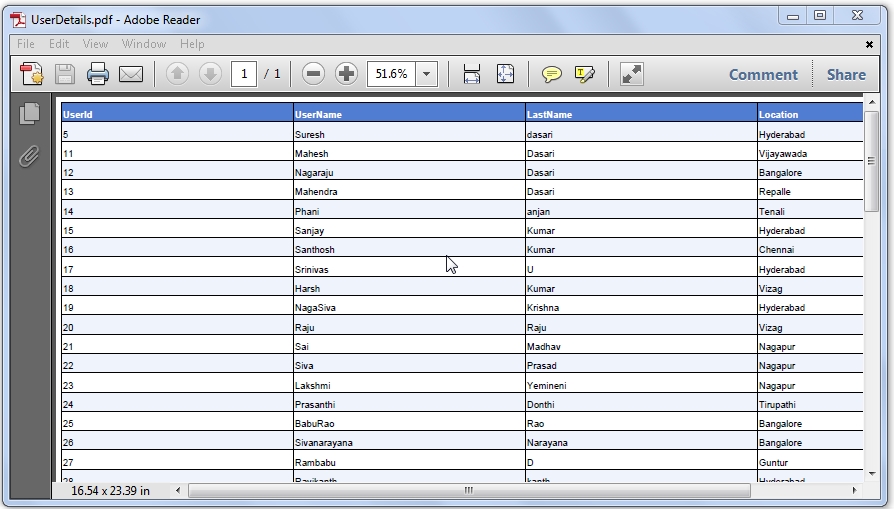 |
If you observe above code I added one function that is VerifyRenderingInServerForm this function is used to avoid the error like “control must be placed in inside of form tag”. If we set VerifyRenderingInServerForm function then compiler will think that controls rendered before exporting and our functionality will work perfectly
Download sample code attached

Now if you’re getting any error message like
Control 'gvdetails' of type 'GridView' must be placed inside a form tag with runat=server
 |
Check this post to solve this problem
Otherwise if you’re getting any error message like
RegisterForEventValidation can only be called during Render();
 |
Check this post to solve your problem

|
If you enjoyed this post, please support the blog below. It's FREE! Get the latest Asp.net, C#.net, VB.NET, jQuery, Plugins & Code Snippets for FREE by subscribing to our Facebook, Twitter, RSS feed, or by email. |
|||
 Subscribe by RSS
 Subscribe by Email
|
|||


158 comments :
i m using the literal data to convert pdf file and an exception occurs after htmlparser.Parse(sr);
line.Please help me..........
hi tiwari i think this problem with pdf dll you should download my attached code and use existing dll in code for your requirement it will work for you
hey suresh...i am using your above code to export data to pdf, when i debug,the function is called but no pdf is created or downloaded. how do i fix this? i am not getting any errors too.
hey suresh...i am using your above code to export data to pdf, when i debug,the function is called but no pdf is created or downloaded. how do i fix this? i am not getting any errors too. how do i debug to see what's wrong and if the pdf is created or not?
the pdf was created successfully but its shows only two lines in vertical thats it please explain it again
hi sindhu,
have you used my attached code dll or another one download attached code dll and try it will work for you
hi,
i check the code it's working fine please check your code once again i think you are making mistake during binding the gridview
awesome work.please continue with these type of services bro.
thanks raja keep visiting.......
error on opening adobe reader token not recognized.
hi subhash that problem with dll in itextsharp you should download attached code and use my dll in your code it will work for you i already mention same thing in comments check it once.
i get pdf but it shows only single column of the gridview...any idea.
hi,
please check your code once again i think you are making mistake during binding the gridview
my pdf working fine...but on upload to the server giving error..namespace itextsharp could not found...suggest somthing...also without using third party tool.
Hai Suresh..thank for your valuable code.. i got an error when i opened PD F file i,e
THERE WAS AN ERROR OCCURRED.WHEN OPENING FILE. THE FILE COULD NOT BE CREATED...
Please do the needful..
Hi, Suresh.. thanks a lot for your help.. My code is working fine.. Keep this good work up.. Thanks again..
Subhadeep
Hello,Suresh I got this error while using this code
Unable to cast object of type 'iTextSharp.text.html.simpleparser.CellWrapper' to type 'iTextSharp.text.Paragraph'.
the pdf was created successfully but its shows only two lines in vertical thats it please explain it again
AND
get pdf but it shows only single column of the gridview...any idea.
ANSWER :
check ur compatibility view settings or browser
Hi Suresh,
Thank you for your code sample.
You code worked beautifully on gridview with siource table with few columns. However, I get parcing error "Illegal characters in path" at line "Dim sr As New StreamReader(sw.ToString())" when I use a table with much more columns.
Any suggestions?
Best regards,
Michael
It shows me this error 'System.IO.IOException: The document has no pages.'
hi Suresh,
i would like to export data to pdf from windows application so can u please help me .
thanks for the article...its very useful...
Hi Suresh...
How can we put a heading to the pdf file before the grid appears...plz help...
Dear, i tried but i found below prob;
Server Error in '/' Application.
Format of the initialization string does not conform to specification starting at index 0.
could you please help me, as i tried multiple time as i have changed connection string many time but prob is not yet resolved :(
convert pdf from gridview problem for fill cs file
Hi..
i got the output pdf but without any colors i got the plain table.how to achieve the colors n styles applied.
hi
this is rekha ,i tried above code bt it showing an error (Illegal characters in path).....:(
can u please help
it's good
what program in gridview to pdf in windows application
System.ArgumentException: Font size too small: 0
when I export the gridview, It's header style backcolor is not getting exported. Can you please, explain me the reason.
when i export the gridview getting error like "System.ArgumentException: Font size too small: 0".
please relpy me sir..
how to convert aspx page to pdf using iTextSharp
and i used gridview to pdf code. but when control reaches pdfDoc.close(), i m getting error message "the document has no pages" y its so
hi, mr.Suresh Dasari
I tried your code.
to export pdf from GridView.
exporting is working but
I cannot change font family and font-size.
please help me.
thanks
Suresh, Thank you for the post.
The PDF produces an outupt, but I get no header row or color. Is there a particular version of iTextSharp.dll that I have to use?
I am using Internet Explorer 6 (old I know) and also FireFox 10.02 with the same results.
Thank you.
how to export only single column ?
Hello boss how to implement StringWriter and StringReader ?? i can't understand this 2 things..
thanks
Hai Sir,I have one query,If am uploading pdf files.i want see that pdf file in own page.its not display any save r open options like in windows we are using adobe reader component na like that i have to display in web pages.it should be displayed in panel like scrolls pls give me solution for this query.its too urgent sir........
loooks good.
hi suresh,
Export Selected GridView Rows to pdf in ASP.NET,i need code can u send me and my mail id msureshbabu15@gmail.com
@sureshbabu......
check below post to export selected rows of gridview http://www.aspdotnet-suresh.com/2011/12/export-selected-gridview-rows-to-excel.html
good article suresh
Hi suresh, I downloaded the iText (5 dlls inside it).In which folder i put that dll.I'm using Visual studio 2010 professional ?
Good one
Good one... Helped me a lot...
hello suresh, first of all i admire your work that you have been doing and its amazing how helpful you are, i have a question, i have been able to export the entire grid as a pdf, but what if i want to write some text ontop of the export, like a heading and some description about the data, how will i be able to do that.
The given key was not present in the dictionary. i have this error
i press in the button and does not do anything
please help me
hello suresh,
im gettin an error while opening the pdf file.it says the file may be corrupted.plz help
I got the error when try to have both the PDF and the Excel:
Compilation Error
Description: An error occurred during the compilation of a resource required to service this request. Please review the following specific error details and modify your source code appropriately.
Compiler Error Message: CS0117: 'iTextSharp.text.Color' does not contain a definition for 'White'
Source Error:
Line 72: foreach (GridViewRow gvrow in gvdetails.Rows)
Line 73: {
Line 74: gvrow.BackColor = Color.White;
Line 75: if (j <= gvdetails.Rows.Count)
Line 76: {
Error 2 Cannot implicitly convert type 'iTextSharp.text.Color' to 'System.Drawing.Color'
Hi guys
I could help but exported to pdf code vb. .net
how to get code from .exe file.if it is there pls tel me
Hey suresh am just a Beginner in c# and you help me out in solving this error
cannot convert from 'System.IO.StringReader' to 'System.IO.StreamReader'
Hi suresh, How to add textbox along with this girdview control which is present outside the gridview. Please help me
Thanks
Naresh
am getting the error as
The document has no pages. please help me...
u r a saviour!!!
Hello, I have learned many things from your post its really nice and also useful for me. Thanks for sharing.
Thank you
Font Converter
using iTextSharp.text;
using iTextSharp.text.pdf;
using iTextSharp.text.html.simpleparser;
i am getting problem when i include these namespaces.
please provide solution.
it does not work in online
Dear Sir, your code works well in local. But I upload this in online I got security exception error. how can i fix this. ...
thanks in advance...
Can i export any panel in to pdf??
If yes then plz provide code for it
sir how can i uploaded pdf file data in editing mode....
or how to export gridview data to pdf
superb
your code was useful..only problem i m facing is that when pdf is genrated,griedviw data is shown properly but why not itz header row and style???header row is blank......
at localhost its working fine but on server it is generating error for security
superb man keep up the good work does this work for datalist too?
Hi suresh,
i needed a demo article on "aspx page content(i.e page should contain text boxes, check box, panels, collapsible panels..)and when ever the button is clicked the page data of the server side should be converted into pdf format"
can u plz upload the article which will be useful to others also....
Hi suresh,
How to export images from gridview to word with 150 height and 150 width.
Thank You
hi suresh,
Thanks for your valuable post.I've one requirement like Exporting a dymamic gridview's data....which is inside a Ajax Collapsible panel extender....as it is to a pdf document
hi i am convert to detail view to pdf
but i have error like this please give me a sum idea to this error
The document has no pages.
pdfDoc.Close();
Hi Suresh, your code working fine with Gridview, however, is it possible to change this to DataList? When I'm trying with DataList control with Templatefield columns, it's showing error: "The document has no pages". But databind is fine and same list is successfully getting export to Excel. Can you please help me to tweak this code for DataList, if any? Anirban
Thanks Suresh for your code. When doing databind without templatefield in gridview, it's working fine. However, when there is templatefield with HTML table inside it, PDF file saying corrupt and can't be opened. Is there any special treatment for templatefiled? Please help me. Thanks again, A. Maitra
hi suresh,
Export Selected GridView Rows to pdf in ASP.NET,i need code can u post that code
hello suresh i use ur code in 2010 but no pdf generated.
Hi,
Gridview is exported to pdf. But showing one line in bottom of the pdf file i.e.
//(function() {var fn = function() {$get("ctl00_ToolScriptmgr_HiddenField").value = '';Sys.Application.remove_init(fn);};Sys.Application.add_init(fn);})();//
Please solve my problem
Thanks
Hi Suresh..I want to open this converted pdf file to
browser..is it possible to directly open in browser without downloading ...if it is possible how?
Hi, Thanks a lot. Your coding is working good. But if i merge some cells in grid, i couldn't convert that to PDF file correctly. All rows and columns are not coming in proper way. But the Excel conversion is good. Please help to solve this problem.,
Thank's.,
hi...
i m gettin below error while exporting formview to pdf
Description: An unhandled exception occurred during the execution of the current web request. Please review the stack trace for more information about the error and where it originated in the code.
Exception Details: System.IO.IOException: The document has no pages.
Source Error:
Line 82: htmlparser.Parse(sr);
Line 83:
Line 84: pdfDoc.Close();
Line 85:
Line 86: Response.Write(pdfDoc);
Hi,
Your code is working fine for me when am clicking 'btnPDF' for the first time.From second time on wards, it is not working.
Note: If i refresh the page once, then the btnPDF_Click is working. That is also first time after refresh.
Do u have any idea on this?
Thanks in advance!
Thanks a lot suresh finally succeeded after copying your itextsharp dll..
hi suresh im having prblm wid this dll cn u plz give me d solution dis code is not wrking for me
actually i am running with one problem,
ie. my html form contains lables and textboxes
itwork fine to render lables on PDF but textboxes values are not rendering on pdf .
can we have solution for that?how?
Hi Suresh,
After using ur coding and dll, i have below problems
"Could not load file or assembly 'itextsharp, Version=4.1.6.0, Culture=neutral, PublicKeyToken=8354ae6d2174ddca' or one of its dependencies. The located assembly's manifest definition does not match the assembly reference. (Exception from HRESULT: 0x80131040)"
hi suresh......
the code is running sucessfully, but the pdf file which is downloaded is showing an error message in this way "there was an error opening this document.the file is damaged and could not be repaired".
will u plz check it once.
hello sir,
getting an error as follows:
The document has no pages.
Description: An unhandled exception occurred during the execution of the current web request. Please review the stack trace for more information about the error and where it originated in the code.
Exception Details: System.IO.IOException: The document has no pages.
hello sir,
getting an error as follows:
The document has no pages.
Description: An unhandled exception occurred during the execution of the current web request. Please review the stack trace for more information about the error and where it originated in the code.
Exception Details: System.IO.IOException: The document has no pages.
please give the solution
Hi Suresh,
This is Arun from Chennai. Thank you for your post. Export to Excel is working fine with me. While working on the Export to PDF, a blank pdf is getting generated with gridview borders and colors and without text.
There are 7 rows in Gridview and 7 rows are displayed in PDF without any text on it.
Please advise how to solve it.
The document has no pages.
HOW TO REMOVE THIS ERROR
suresh..how to transfer the web application data to pdf format in button click
suresh please help me......how to pass the data to pdf in button click..i don't know how to design the labels & textbox..in pdf..
im getting error on pdfDoc.Close(); the error is:
The document has no pages.
plzz help its urgent... thnx in advance :)
I am getting this error
Unable to cast object of type 'iTextSharp.text.html.simpleparser.CellWrapper' to type 'iTextSharp.text.html.simpleparser.TableWrapper'. please help
Server Error in '/' Application.
Control 'MainContent_gridstorageshow' of type 'GridView' must be placed inside a form tag with runat=server.
Description: An unhandled exception occurred during the execution of the current web request. Please review the stack trace for more information about the error and where it originated in the code.
Exception Details: System.Web.HttpException: Control 'MainContent_gridstorageshow' of type 'GridView' must be placed inside a form tag with runat=server.
Source Error:
Line 49: gridstorageshow.AllowPaging = false;
Line 50: gridstorageshow.DataBind();
Line 51: gridstorageshow.RenderControl(hw);
Line 52: Response.Output.Write(sw.ToString());
Line 53: Response.Flush();
how to create header report?
Hi,
I'm having master page. I want to print the whole page with the values in PDF. Can anyone help me on this. Please its urgent. Thanks
Regards,
Umesh
I see few people added the error error 'System.IO.IOException: The document has no pages.'
Did anyone figure out the prob. If so can someone please update.
Is this ITextSharp dll is free
sir is there any way to store data(using fileupload) in text format or string format rather than using binary format .
Hai suresh,
im exporting ASP.Net Panel control (which is rendered as HTML DIV) to PDF using iTextSharp, but my problem is after exporting it to pdf when i look at that document the labels present in the document are scattered through out the page. may i know the problem !!
thanks in advance
Hi,
Excelent help, it's works but a need to put titles on header of the grid view and i can't do it...someone can tell me how???
thanks in advance
Hi Suresh,
Great job man ... But i do have one doubt ... only changing or replacing my dll with yours provided in your code ... how does it solve the problems ??
I am getting Error like this please help me Suresh The best overloaded method match for
'iTextSharp.text.html.simpleparser.HTMLWorker.Parse(System.IO.StreamReader)' has some invalid arguments
I got this error please help me
Server Error in '/ExportGrid' Application.
The DataSourceID of 'gvdetails' must be the ID of a control of type IDataSource. A control with ID 'dsdetails' could not be found.
Description: An unhandled exception occurred during the execution of the current web request. Please review the stack trace for more information about the error and where it originated in the code.
Exception Details: System.Web.HttpException: The DataSourceID of 'gvdetails' must be the ID of a control of type IDataSource. A control with ID 'dsdetails' could not be found.
Source Error:
An unhandled exception was generated during the execu
Hi,
I'm trying to convert the entire page export to pdf
and used the below code to render entire page.
this.Page.RenderControl(hw),But ,below error throws in html parser...Pls help me in this..
The number of columns in PdfPTable constructor must be greater than zero.
hi mr.suresh i used your code. its runing 100% fine with local host, but when i uploaded the application on the server, it gives an error.
server could not find the file from the "Bin" folder. how to fix this problem.
Line 7: using iTextSharp.text;
Compiler Error Message: CS0246: The type or namespace name 'iTextSharp' could not be found (are you missing a using directive or an assembly reference?)
hiii sir
i have a query, if i have two grid view on page and i want to convert one grid view data into pdf please tell me how can i convert it.I am converting in pdf, but the pdf file contain both grid data. Please Reply
Response.ContentType = "application/pdf";
Response.AddHeader("content-disposition", "attachment;filename=UserDetails.pdf");
Response.Cache.SetCacheability(HttpCacheability.NoCache);
StringWriter sw = new StringWriter();
HtmlTextWriter hw = new HtmlTextWriter(sw);
gvdetails.AllowPaging = false;
gvdetails.DataBind();
gvdetails.RenderControl(hw);
gvdetails.HeaderRow.Style.Add("width", "15%");
gvdetails.HeaderRow.Style.Add("font-size", "10px");
gvdetails.Style.Add("text-decoration", "none");
gvdetails.Style.Add("font-family", "Arial, Helvetica, sans-serif;");
gvdetails.Style.Add("font-size", "8px");
StringReader sr = new StringReader(sw.ToString());
Document pdfDoc = new Document(PageSize.A2, 7f, 7f, 7f, 0f);
HTMLWorker htmlparser = new HTMLWorker(pdfDoc);
PdfWriter.GetInstance(pdfDoc, Response.OutputStream);
pdfDoc.Open();
htmlparser.Parse(sr);
pdfDoc.Close();
Response.Write(pdfDoc);
Response.End();
I have used your code and it works superb, thanks .
However I have another requirement that I have a page which contains some static data likes labels and textbox values, then gridveiw data, then again some labels. How will you export all these details into one pdf? Can you pls help me?
Hie Suresh
Thnax in advance for your excellent codes . I have used above code to export grid view data to adobe file in a neat & presentable manner. It worked well in localhost. But when i uploaded the files in to my domain, its not working . Could you please tell me why ? . I tried many times but in vain...
sir i want to add a new row at the top of pdf file like a header but i don't want to display in our web application when i am running , the header only display when we download gridview data into pdf format
WHICH BUUTON YOU USE FOR WRITTING THIS CODE
Is this Normal button Which You Write a Coding bcoz i found error nesr Response??///
can you send me VB code for same task....
thanks
this article works and convert the gridview into pdf but gridview rows are not converted into pdf only header of grid view columns are coming. Y does it happens any one help me
Nice article, but how would you add a header with image next to it above the gridview in the PDF?
Never mind my previous question, I found the answer:
string imagepath = Server.MapPath("Images");
iTextSharp.text.Image jpg = iTextSharp.text.Image.GetInstance(imagepath + "/MyImage.jpg");
Paragraph paragraph = new Paragraph(@"Programming is Great Stuff!");
paragraph.Alignment = Element.ALIGN_CENTER;
paragraph.SpacingAfter = 35f;
in my grid view images are there when i am click on print,its getting path error suresh
hello suresh,
I want one solution for pdf file-
I convert my webpage to pdf format, but i want to pass my gridview column widths also in pdf, pdf takes it's own widths.
I want to display same format of gridview in pdf file.plz help me. thanks
Hi,
i have tried the code but but m getting an error
ie.
The document has no pages.
The document has no pages.
After generating pdf only show gridview row...,no any data in gridview...
Hello All,
Who are getting page not found error plz remove following lines from code
gvdetails.AllowPaging = false;
gvdetails.DataBind();
Thanks.
I want SUMMARY TABLE,gridview data,Graph based on data,Page Number,Logo in heading,Minimum 2 graphs per page in Email_Id is Kapilbhati2310@yahoo.com
hi sir......
i have a problem related to pdf .in my gridview have have some tools like label(Which is used to display the data).and no any rows and colon ,
In my gridview basically display the Information about the Proforma Invoice .
like..... name jagat singh yadav Id -1423
programe MCA
and also display picture like logo..........
So please Help me .if you have any solution about this please tell............
hi,
use your converted code in VB but gives me error:
String format INPUT INCORRECT
pdfDoc.Open ()
htmlparser.Parse (sr)
pdfDoc.Close ()
my page is .aspx page containing 2 table, 1 div and some labels with data loaded from SqlDataSource. . . .
can you give me some indication,
thanks
sorry my english . . . . .
Si usan Master Page, se soluciona de esta forma agregando en el web.config esto
"system.web"
"pages buffer="true"
masterPageFile = "~/Site1.master"
enableEventValidation="false""
" /pages"
"/system.web"
I have this error:
"The document has no pages."
please guide me.
Nice work brother,, could you pls put some code how to read content from pdf and display it in gridview..?
The type or namespace name 'iTextSharp' could not be found (are you missing a using directive or an assembly reference?)
After adding reference it still shows the error like above.
hi! how to convert text box value and background image to pdf file using itextsharp
hii suresh, how can we set heading line in pdf
I have bind my datagrid view programatically
when i download i get nothing
I want to display the Header and footer for the pdf with logo. Can please help me...
hii sir ,
sir i want to say that i text dll can be used for editing the pdf documents like draw a cropa ,line sticky notes as .. if possible then pl send some code to neelugupta30@gmail.com. thanks
How i export Grid (Large data more than 1 lac ) data to PDF in .net ?
hi suresh,
i use your code but it's not exporting my gridview data to pdf.
my scenario is like this i have a input form which has text boxes and drop down lists on it after having input from user data is saved in database and bind into grid view. after that i want to export grid view data to pdf.
also that my grid view has multiple pages.
In my case when i click export button focus will go back to first field of the form.
pls help what to do.
thanks.
Dear suresh sir,
iam reading your articals lost couple of months
but now i have a problem
i need to export the a c#.net windows page data to pdf
in that form i don't have datagrid
i have labels and txtboxes but
i need to export the data to pdf..
help me asap
thanks and regards
prasad bhagat
Sir can you explain step by step for clear understanding?
thanx in advance
Hello suresh,
Can you say how to customize the gridview widths in pdf as of in web page as the itextsharp is taking gridview as "table"
sorry , i solved that problem .but i got error on
System.IO.IOException was unhandled by user code
HResult=-2146232800
Message=The document has no pages.
Source=itextsharp
help me.
1.Please upload code for import selected gridview coloumns data into graph
2.please upload code for import slected grid view data into excel or pdf without using check box
Mine does not print the column headings, Please HELLLLP
i have an error "document have no pages"
i m not getting an option of stringwriter in my .net wat to do
inside update panel gridviw data does not get exported
protected void Button4_Click(object sender, EventArgs e)
{
ExportGridToPDF();
}
private void ExportGridToPDF()
{
gvregistration.Visible = true;
Response.ContentType = "application/pdf";
Response.AddHeader("content-disposition", "attachment;REGISTRATION1.pdf");
Response.Cache.SetCacheability(HttpCacheability.NoCache);
StringWriter sw = new StringWriter();
HtmlTextWriter hw = new HtmlTextWriter(sw);
gvregistration.RenderControl(hw);
StringReader sr = new StringReader(sw.ToString());
Document pdfDoc = new Document(PageSize.A4, 10f, 10f, 10f, 0f);
HTMLWorker htmlparser = new HTMLWorker(pdfDoc);
PdfWriter.GetInstance(pdfDoc, Response.OutputStream);
pdfDoc.Open();
htmlparser.Parse(sr);
pdfDoc.Close();
Response.Write(pdfDoc);
Response.End();
GridView1.AllowPaging = true;
GridView1.DataBind();
}
public override void VerifyRenderingInServerForm(Control control)
{
/* Verifies that the control is rendered */
}
using System;
using System.Collections.Generic;
using System.Linq;
using System.Web;
using System.Web.UI;
using System.Web.UI.WebControls;
using Oracle.DataAccess.Client;
using Oracle.DataAccess.Types;
using System.Data;
using iTextSharp.text;
using iTextSharp.text.html.simpleparser;
using iTextSharp.text.pdf;
using System.IO;
using System.Text;
For me it occurs an error as
Unable to cast object of type 'iTextSharp.text.html.simpleparser.IncTable' to type 'iTextSharp.text.IElement'.
I am getting error on hw.Parse(sr);
"Unable to cast object of type 'iTextSharp.text.html.simpleparser.CellWrapper' to type 'iTextSharp.text.Paragraph'.
MyCode
public void GeneratePDF()
{
string body;
//Read template file from the App_Data folder
using (var sr = new StreamReader(Server.MapPath("\\PDFTemplate\\") + "test.html"))
{
body = sr.ReadToEnd();
}
if (User.Identity.IsAuthenticated)
{
string filenm = "MyIDCard.pdf";
Response.ClearContent();
Response.ClearHeaders();
Response.ContentType = "application/pdf";
Response.AddHeader("Content-Disposition", "inline;filename=" + filenm + "");
Response.Cache.SetCacheability(HttpCacheability.NoCache);
ApplicationDbContext db = new Models.ApplicationDbContext();
var userId = User.Identity.GetUserId();
ApplicationUser user = db.Users.Where(x => x.Id == userId).FirstOrDefault();
string pdfBody = string.Format(body,user.FirstName,user.LastName,user.Email,user.PhoneNumber );
StringReader sr = new StringReader(pdfBody.ToString());
Document pdfDoc = new Document(PageSize.A6,1f,1f,1f,1f);
HTMLWorker hw = new HTMLWorker(pdfDoc);
PdfWriter.GetInstance(pdfDoc, Response.OutputStream);
pdfDoc.Open();
hw.Parse(sr);
pdfDoc.Close();
Response.Write(pdfDoc);
Response.End();
}
}
same problem guys !! is there a solution for HTMLworker is obselete !!
Note: Only a member of this blog may post a comment.