
Introduction
Here I will explain how to insert data into XML and how to retrieve data from XML and how to bind data to DataList using asp.net.
Description:
XML means Extensible markup language why we need to use this one because by using XML we can store the data and we can easily retrieve and display the data without using database in our applications.if we need to display dynamic data in our application it will take time to conenct database and retrive data from database but if use XML to store data we can do operations with xml file directly without using database. If we store data in database that is incompatible to some of the computer applications but if we store data in XML format it will support for all applications. It is independent for all software applications and it is accessible with all applications.
Now I will explain inserting data into xml and retrive data from XML and bind data to datalist with simple example.
Design your aspx page like this
<html xmlns="http://www.w3.org/1999/xhtml">
<head id="Head1" runat="server">
<title></title>
</head>
<body>
<form id="form1" runat="server">
<div>
<table>
<tr>
<td style="width: 100px">
Name:</td>
<td style="width: 100px">
<asp:TextBox ID="txtName" runat="server"></asp:TextBox></td>
</tr>
<tr>
<td style="width: 100px">
Location:</td>
<td style="width: 100px">
<asp:TextBox ID="txtLocation" runat="server"></asp:TextBox></td>
</tr>
<tr>
<td style="width: 100px">
Email:</td>
<td style="width: 100px">
<asp:TextBox ID="txtEmail" runat="server"></asp:TextBox></td>
</tr>
<tr>
<td style="width: 100px" valign="top">
Comments:</td>
<td style="width: 100px">
<asp:TextBox ID="txtComments" runat="server" TextMode="MultiLine" Height="104px"></asp:TextBox></td>
</tr>
<tr>
<td></td>
<td>
<asp:Button ID="btnSubmit" runat="server" OnClick="btnSubmit_Click" Text="Submit" /></td>
</tr>
</table>
<br />
<asp:DataList ID="dlComments" Runat="server" Width="100%">
<ItemTemplate>
<hr size=0/>
Name: <%# DataBinder.Eval(Container.DataItem, "name") %><br />
E-mail: <a href="mailto:<%# DataBinder.Eval(Container.DataItem, "email") %>"><%# DataBinder.Eval(Container.DataItem, "email") %></a><br />
Location: <%# DataBinder.Eval(Container.DataItem, "location") %><br />
Date: <%# DataBinder.Eval(Container.DataItem, "Date") %><br />
Description: <%# DataBinder.Eval(Container.DataItem, "Description") %>
</ItemTemplate>
</asp:DataList>
</div>
</form>
</body>
</html>
|
After that add XML file to your application and give name as "Sample.xml" intially xml file like this root element is compulsary for XML files that’s why I added CommentInformation in XML file that root element in XML file.
<?xml version="1.0" encoding="utf-8"?>
<CommentsInformation>
</CommentsInformation>
|
After that add this namespace in codebehind
using System.Xml;
using System.Data;
|
After that write the following code in code behind
protected void Page_Load(object sender, EventArgs e)
{
if (!IsPostBack)
{
//Bind xml data to datalist
BindDatalist();
}
}
/// <summary>
/// btnSubmit event is used to insert data into XML file
/// </summary>
/// <param name="sender"></param>
/// <param name="e"></param>
protected void btnSubmit_Click(object sender, EventArgs e)
{
XmlDocument xmldoc = new XmlDocument();
xmldoc.Load(Server.MapPath("Sample.xml"));
XmlElement parentelement = xmldoc.CreateElement("Comments");
XmlElement name = xmldoc.CreateElement("Name");
name.InnerText = txtName.Text;
XmlElement location = xmldoc.CreateElement("location");
location.InnerText = txtLocation.Text;
XmlElement email = xmldoc.CreateElement("Email");
email.InnerText = txtEmail.Text;
XmlElement Description = xmldoc.CreateElement("Description");
Description.InnerText = txtComments.Text;
XmlElement date = xmldoc.CreateElement("Date");
date.InnerText = DateTime.Now.ToString();
parentelement.AppendChild(name);
parentelement.AppendChild(location);
parentelement.AppendChild(email);
parentelement.AppendChild(Description);
parentelement.AppendChild(date);
xmldoc.DocumentElement.AppendChild(parentelement);
xmldoc.Save(Server.MapPath("Sample.xml"));
BindDatalist();
}
/// <summary>
/// Bind xml data to datalist
/// </summary>
private void BindDatalist()
{
XmlTextReader xmlreader = new XmlTextReader(Server.MapPath("Sample.xml"));
DataSet ds = new DataSet();
ds.ReadXml(xmlreader);
xmlreader.Close();
if (ds.Tables.Count != 0)
{
dlComments.DataSource = ds;
dlComments.DataBind();
}
else
{
dlComments.DataSource = null;
dlComments.DataBind();
}
}
|
Demo
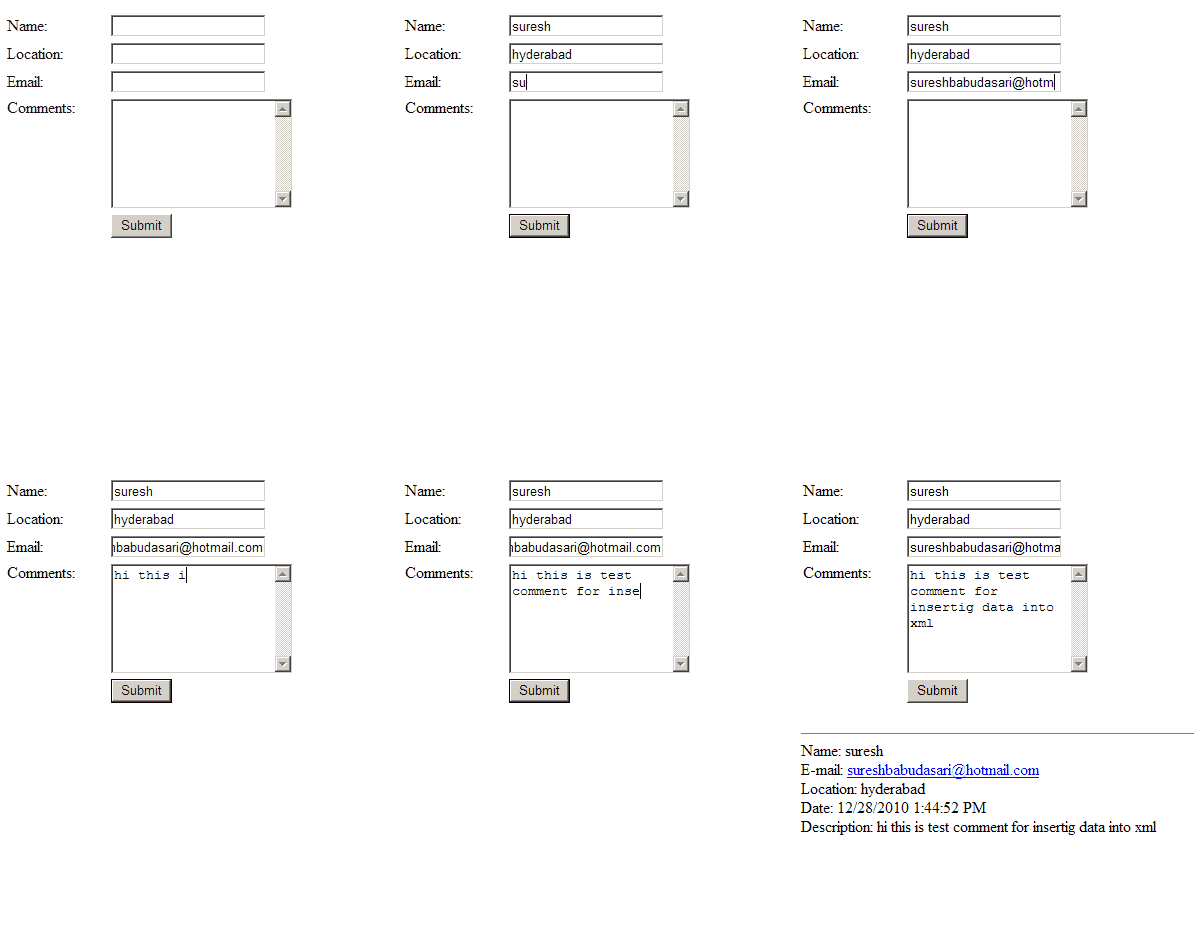 |
Download sample code attached

Check this post also here I explained

Check this post also here I explained

|
If you enjoyed this post, please support the blog below. It's FREE! Get the latest Asp.net, C#.net, VB.NET, jQuery, Plugins & Code Snippets for FREE by subscribing to our Facebook, Twitter, RSS feed, or by email. |
|||
 Subscribe by RSS
 Subscribe by Email
|
|||


32 comments :
useful Post
thank you
in xml how to create multiple parent root like
----
----
please help me if u know that...
my Email:madhan2008@gmail.com
gbv nvn
Very useful for basic dotnet learners,Better you can post step by step Learning
excellent
This is good article.
HOW TO COMPARE XML NODE TEXT WITH THE TEXTBOX VALUE WHILE INSERTING NEW RECORD?
The process cannot access the file 'D:\Sateesh\Projects\WebApplication1\WebApplication1\sample.xml' because it is being used by another process. how can i solve this........
The process cannot access the file 'D:\Asp.NET and Sql Server\Implementation\XML\XML-FILES\EMPLOYEEINFO.xml' because it is being used by another process.
thanks........
Thanks man.. u r doing the fab work. thank you once again
using xml data in web applications is safe enough
thank you bhaiya!!!!!!!!!!!!!
suresh bhayya exellent example but we want also without using xml file in datalist how to write that
Thanks nice post.
hey by using ur code we can only save single time in xml, but if i want to save multiple data in same xml, wat can we do? could you help us...!
in ASPX PAGE ANY ERROR PLEASE HELP
I am trying to execute but not executing code help me please
thanku
Hello suresh garu, I got this problem when i am click on submit button don't display data in datalist. in 2nd execution the previous data will display but not current data when click the submit button, what can i do? give me solution.
thank you, first how to that work for me!
protected void btnSubmit_click(object sender, EventArgs e)
{
XmlDocument xmldoc = new XmlDocument();
xmldoc.Load(Server.MapPath("XMLFile.xml"));
XmlElement baseelement = xmldoc.CreateElement("Comments");
XmlElement name = xmldoc.CreateElement("Name");
name.InnerText=txtName.Text;
in the above line "txtName" shows an error
the error is txtName does not exits in the current context.
help me out from here.
Anil Kumar
use your own textbox id instead of txtName ,
thanku so much .it helped me alot
It is very usefull thing
protected void Page_Load(object sender, EventArgs e)
{
if (!IsPostBack)
{
XmlDocument xmlDoc = new XmlDocument();
xmlDoc.Load(@"K:\ASP.Net Code\JithinXML\JithinXML\Books.xml");
foreach (XmlNode xmlNode in xmlDoc.DocumentElement.ChildNodes)
{
string ID = xmlNode.Attributes["id"].Value;
string Name = xmlNode.ChildNodes[0].InnerText;
ListItem li = new ListItem(Name, ID);
booksList.Items.Add(li);
}
}
}
protected void booksList_SelectedIndexChanged(object sender, EventArgs e)
{
XmlDocument xmlDoc = new XmlDocument();
xmlDoc.Load(@"K:\ASP.Net Code\JithinXML\JithinXML\Books.xml");
foreach (XmlNode xmlNode in xmlDoc.DocumentElement.ChildNodes)
{
if (booksList.SelectedItem.Value == xmlNode.Attributes["id"].Value)
{
txtName.Text = xmlNode.ChildNodes[0].InnerText;
txtPrice.Text = xmlNode.ChildNodes[1].InnerText;
txtSerial.Text = xmlNode.Attributes["id"].Value;
break;
}
}
}
balarama
6
poombata
10
kalikkudukka
15
balarama
6
poombata
10
kalikkudukka
15
public partial class WebForm1 : System.Web.UI.Page
{
protected void Page_Load(object sender, EventArgs e)
{
GetDate();
}
private void GetDate()
{
SampleDataContext dbContext = new SampleDataContext();
GridView1.DataSource = dbContext.Employees;
GridView1.DataBind();
}
protected void Button1_Click(object sender, EventArgs e)
{
using (SampleDataContext dbContext = new SampleDataContext())
{
int id = Convert.ToInt32(tbID.Text);
//tbFN.Text =Convert.ToString(dbContext.Employees.Where(x => x.ID == id).Select(emp => new { emp.FirstName }));
var record = dbContext.Employees.Select(s=> s).Where(s => s.ID == id).ToList();
tbFN.Text = record.First().FirstName.ToString();
tbLN.Text = record.First().LastName.ToString();
tbGender.Text = record.First().Gender.ToString();
tbDepartment.Text = record.First().DepartmentId.ToString();
tbSalary.Text = record.First().Salary.ToString();
}
GetDate();
}
protected void Button2_Click(object sender, EventArgs e)
{
using (SampleDataContext dbContext = new SampleDataContext())
{
Employee newEmployee = new Employee
{ //ID =Convert.ToInt32(tbID.Text),
FirstName = tbFN.Text,
LastName = tbLN.Text,
Gender = tbGender.Text,
Salary = Convert.ToInt32(tbSalary.Text),
DepartmentId = Convert.ToInt32(tbDepartment.Text)
};
dbContext.Employees.InsertOnSubmit(newEmployee);
dbContext.SubmitChanges();
GetDate();
}
}
protected void Button3_Click(object sender, EventArgs e)
{
using (SampleDataContext dbContext = new SampleDataContext())
{
int id = Convert.ToInt32(tbID.Text);
Employee emp = dbContext.Employees.SingleOrDefault(x => x.ID ==id);
emp.FirstName = tbFN.Text;
emp.LastName = tbLN.Text;
emp.Gender = tbGender.Text;
emp.Salary = 50000;
dbContext.SubmitChanges();
GetDate();
}
}
protected void Button4_Click(object sender, EventArgs e)
{
using (SampleDataContext dbContext = new SampleDataContext())
{
int id = Convert.ToInt32(tbID.Text);
Employee emp = dbContext.Employees.SingleOrDefault(x => x.ID == id);
dbContext.Employees.DeleteOnSubmit(emp);
dbContext.SubmitChanges();
GetDate();
}
}
}
Insert
protected void Button1_Click(object sender, EventArgs e)
{
using (SampleDataContext dbContext = new SampleDataContext())
{
XMLtable xml = new XMLtable
{
id = Convert.ToInt32(txtSerial.Text),
name = txtName.Text,
price =txtPrice.Text
};
dbContext.XMLtables.InsertOnSubmit(xml);
dbContext.SubmitChanges();
}
}
Note: Only a member of this blog may post a comment.