
Introduction:
Here I will explain how to import data from excel to gridview in asp.net using OLEDB in C#, VB.NET.
Here I will explain how to import data from excel to gridview in asp.net using OLEDB in C#, VB.NET.
Description:
In previous article I explained How to Export gridview data to excel/word document, Import Excel data to sql database and some other articles relating to export gridview data. Now I will explain how to import data from excel to gridview in asp.net.
In previous article I explained How to Export gridview data to excel/word document, Import Excel data to sql database and some other articles relating to export gridview data. Now I will explain how to import data from excel to gridview in asp.net.
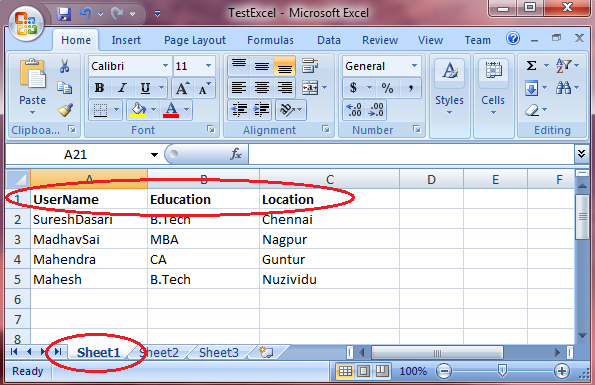 |
Once excel creation
done we need to create new website and write the following code in your aspx page
<html xmlns="http://www.w3.org/1999/xhtml">
<head>
<title>Read and Display Data From an Excel File (.xsl or .xlsx) in
ASP.NET</title>
</head>
<body>
<form id="form1"
runat="server">
<div>
<b>Please Select Excel File: </b>
<asp:FileUpload ID="fileuploadExcel"
runat="server"
/>
<asp:Button ID="btnImport"
runat="server"
Text="Import
Data" OnClick="btnImport_Click" />
<br />
<asp:Label ID="lblMessage"
runat="server"
Visible="False"
Font-Bold="True"
ForeColor="#009933"></asp:Label><br />
<asp:GridView ID="grvExcelData"
runat="server">
<HeaderStyle BackColor="#df5015" Font-Bold="true" ForeColor="White" />
</asp:GridView>
</div>
</form>
</body>
</html>
|
Now
open code behind file and add the following namespaces
using System;
using System.Data;
using System.Data.OleDb;
using System.IO;
|
After
that write the following code in code behind
C#.NET Code
protected void
btnImport_Click(object sender, EventArgs e)
{
string connString = "";
string strFileType = Path.GetExtension(fileuploadExcel.FileName).ToLower();
string path = fileuploadExcel.PostedFile.FileName;
//Connection String to Excel
Workbook
if (strFileType.Trim() == ".xls")
{
connString = "Provider=Microsoft.Jet.OLEDB.4.0;Data
Source=" + path + ";Extended
Properties=\"Excel 8.0;HDR=Yes;IMEX=2\"";
}
else if (strFileType.Trim() == ".xlsx")
{
connString = "Provider=Microsoft.ACE.OLEDB.12.0;Data
Source=" + path + ";Extended
Properties=\"Excel 12.0;HDR=Yes;IMEX=2\"";
}
string query = "SELECT
[UserName],[Education],[Location] FROM [Sheet1$]";
OleDbConnection conn = new OleDbConnection(connString);
if (conn.State == ConnectionState.Closed)
conn.Open();
OleDbCommand cmd = new OleDbCommand(query, conn);
OleDbDataAdapter da = new OleDbDataAdapter(cmd);
DataSet ds = new DataSet();
da.Fill(ds);
grvExcelData.DataSource = ds.Tables[0];
grvExcelData.DataBind();
da.Dispose();
conn.Close();
conn.Dispose();
}
|
VB.NET Code:
Imports System.Data
Imports System.Data.OleDb
Imports System.IO
Partial Class
Default2
Inherits System.Web.UI.Page
Protected Sub
Page_Load(ByVal sender As Object, ByVal e As
EventArgs)
End Sub
Protected Sub
btnImport_Click(ByVal sender As Object, ByVal e As
EventArgs)
Dim connString As String = ""
Dim strFileType As String =
Path.GetExtension(fileuploadExcel.FileName).ToLower()
Dim path__1 As String = fileuploadExcel.PostedFile.FileName
'Connection String to Excel
Workbook
If strFileType.Trim() = ".xls"
Then
connString = "Provider=Microsoft.Jet.OLEDB.4.0;Data
Source=" & path__1 & ";Extended
Properties=""Excel 8.0;HDR=Yes;IMEX=2"""
ElseIf strFileType.Trim() = ".xlsx" Then
connString = "Provider=Microsoft.ACE.OLEDB.12.0;Data
Source=" & path__1 & ";Extended
Properties=""Excel 12.0;HDR=Yes;IMEX=2"""
End If
Dim query As String = "SELECT
[UserName],[Education],[Location] FROM [Sheet1$]"
Dim conn As New OleDbConnection(connString)
If conn.State = ConnectionState.Closed Then
conn.Open()
End If
Dim cmd As New OleDbCommand(query, conn)
Dim da As New OleDbDataAdapter(cmd)
Dim ds As New DataSet()
da.Fill(ds)
grvExcelData.DataSource = ds.Tables(0)
grvExcelData.DataBind()
da.Dispose()
conn.Close()
conn.Dispose()
End Sub
End Class
|
Demo
 |

|
If you enjoyed this post, please support the blog below. It's FREE! Get the latest Asp.net, C#.net, VB.NET, jQuery, Plugins & Code Snippets for FREE by subscribing to our Facebook, Twitter, RSS feed, or by email. |
|||
 Subscribe by RSS
 Subscribe by Email
|
|||


64 comments :
Hi suresh
i am getting the following error can u help
'The Microsoft Jet database engine cannot open the file ''. It is already opened exclusively by another user, or you need permission to view its data."
hii suresh i am getting error like
The Microsoft Access database engine could not find the object 'Sheet1$'. Make sure the object exists and that you spell its name and the path name correctly. If 'Sheet1$' is not a local object, check your network connection or contact the server administrator.
provide me some help
actually where you copied all these codings
Hi;
can you help me solving this error...
'The Microsoft Jet database engine cannot open the file ''. It is already opened exclusively by another user, or you need permission to view its data."
The Microsoft Access database engine could not find the object 'Sheet1$'. Make sure the object exists and that you spell its name and the path name correctly
Could not find installable ISAM.....:(........anyone help me out...
Hi suresh
i am getting the following error can u help
'The Microsoft Jet database engine cannot open the file ''. It is already opened exclusively by another user, or you need permission to view its data."
please solve the problem its necessary
when program is rununning
and i click on import data after choose file
this error occur
The Microsoft Office Access database engine cannot open or write to the file ''. It is already opened exclusively by another user, or you need permission to view and write its data.
whoever is having problem like "The Microsoft Office Access database engine cannot open or write to the file ''. It is already opened exclusively by another user, or you need permission to view and write its data." check below article to solve that problem
http://www.aspdotnet-suresh.com/2013/01/c-microsoft-office-access-database.html
How can i read excel file and make update sql script based upon some column value .Also i want to write these update sql script to a text file ..
Someone please help.
How can i read excel file and make update sql script based upon some column value .Also i want to write these update sql script to a text file ..
Someone please help.
i copy paste above code ... how to obtain connectionstring ?
i got an error
The Microsoft Office Access database engine could not find the object 'Sheet2$'. Make sure the object exists and that you spell its name and the path name correctly.
i copy paste above code ... how to obtain connectionstring ?
its still not working sir
Hello sir,
which excel connection string is used if we upload the website on remote server
hi suresh.... i am getting the following error can u help me plz sir....
The Microsoft Jet database engine could not find the object 'Sheet1$'. Make sure the object exists and that you spell its name and the path name correctly.
hi
am getting this error
The 'Microsoft.ACE.OLEDB.12.0' provider is not registered on the local machine
@gayathri n...
check this article http://www.aspdotnet-suresh.com/2012/12/iis7-microsoftaceoledb120-provider-is.html
Thank you suresh.I tried that only.but did not get the answer.All your posts are very usefull.Thank you very much.
hii suresh i am getting error like
The Microsoft Access database engine could not find the object 'Sheet1$'. Make sure the object exists and that you spell its name and the path name correctly. If 'Sheet1$' is not a local object, check your network connection or contact the server administrator.
provide me some help
if wrong data (datatype) is entered, i dont know how it catchs it and returning (space) to gridview at that element's place. This is a big problem for me. please help asap ! Thanx in advance
thank u for ur valuable solutions.
i have done and its working here i want to get some more solution that i want to make some changes to data in grid view and to store in sql server.
plz tell me the solution or else mail me abhid.mca@gmail.com
hello suresh,
please reply to my post.
yes i got the result...
am getting an error which states:
Make sure that the path name is spelled correctly and that you are connected to the server on which the file resides.
Suggest me an answer...
Thanks in Advance....
i hv 50 tables in MS access database with data
& same tables in the SQL database in visual studio..................)
If I update Ms access database then how can i show updated data in Sql server.
plz tell me this one hw can i do this ....how can i show updated data in SQL database & this data display on grid view on browser.
can u upload this type of artical................
all articals r good.....................):
thank you.!!!!!!!
"The Microsoft Jet database engine cannot open the file ''. It is already opened exclusively by another user, or you need permission to view its data." I have this problem. Hot to fix it. Thanks.
I need to add a column with a file upload control to my grid view so that I can upload files against any particular row. Is it possible to do this, ideally I need to be able to do this without putting the gridview into it's edit state.
i am getting error when i use inherits System.Web.Ui.Page
and
fileuploadExcel is not declared
Hello Sir
This Code Help Me A Lot
Thanks
One More Thing,Please Can You Suggest Me once we got data from excel file into data table than how we insert that data into sql server database without pre creating table into database?
Hello sir i have read your blog it is so much informative and valueable can you suggest or tell me a way where data from two excelsheets can be transferred to one single database
Hi Guys This is "Chandan". Those who are getting the following bug "The Microsoft Access database engine could not find the object 'Sheet1$'. Make sure the object exists and that you spell its name and the path name correctly. If 'Sheet1$' is not a local object, check your network connection or contact the server administrator."
can be checked out with this code
protected void btnImport_Click(object sender, EventArgs e)
{
string connString = "";
string strFileType = Path.GetExtension(fileuploadExcel.FileName).ToLower();
string path = fileuploadExcel.PostedFile.FileName;
string fileBasePath = Server.MapPath("~/Files/");
string fileName = Path.GetFileName(this.fileuploadExcel.FileName);
string fullFilePath = fileBasePath + fileName;
//Connection String to Excel Workbook
if (strFileType.Trim() == ".xls")
{
connString = "Provider=Microsoft.Jet.OLEDB.4.0;Data Source=" + fullFilePath + ";Extended Properties=\"Excel 8.0;HDR=Yes;IMEX=1\"";
}
else if (strFileType.Trim() == ".xlsx")
{
connString = "Provider=Microsoft.ACE.OLEDB.12.0;Data Source=" + fullFilePath + ";Extended Properties=\"Excel 12.0;HDR=Yes;IMEX=1\"";
}
if (fileuploadExcel.HasFile)
{
string query = "SELECT [UserName],[Education],[Location] FROM [Sheet1$]";
OleDbConnection conn = new OleDbConnection(connString);
if (conn.State == ConnectionState.Closed)
conn.Open();
OleDbCommand cmd = new OleDbCommand(query, conn);
OleDbDataAdapter da = new OleDbDataAdapter(cmd);
DataSet ds = new DataSet();
da.Fill(ds);
grvExcelData.DataSource = ds.Tables[0];
grvExcelData.DataBind();
da.Dispose();
conn.Close();
conn.Dispose();
}
}
Assume that "fileuploadExcel" is the asp.net upload control and you must have your excel file inside the "Files" folder of your application.
thank you , you coding helped alot
wowwwwwwwwwwwwwww it worked :) thank yo
it is fine for localhost..., But what if we are doing same on remote server. we will have to upload the file first in our project directory on server??? How to do it on remote server by selecting file from clients pc....
protected void btnImport_Click(object sender, EventArgs e)
{
string path = Server.MapPath("~/App_Data/") + fileuploadExcel.FileName;
fileuploadExcel.SaveAs(path);
string a = fileuploadExcel.PostedFile.FileName;
OleDbConnection con_excel = new OleDbConnection("Provider=Microsoft.ACE.OLEDB.12.0;Data Source=" + path + ";Extended Properties=Excel 8.0");
OleDbDataAdapter adpt = new OleDbDataAdapter("SELECT * FROM [Sheet1$]", con_excel);
DataSet ds = new DataSet();
adpt.Fill(ds, "tbl_temp");
grvExcelData.DataSource = ds.Tables["tbl_temp"];
grvExcelData.DataBind();
}
Hi....Sir i am getting this error..
The Microsoft Office Access database engine could not find the object 'Sheet1$'. Make sure the object exists and that you spell its name and the path name correctly.
hi....suresh i am getting this error
The Microsoft Office Access database engine could not find the object 'Sheet1$'. Make sure the object exists and that you spell its name and the path name correctly.
Can we do this same using partial page-load ?
HI SURESH ...I AM WORKING WITH LARGE excel file which has 300 columns . I want to upload that file to database...but it is uploading only 256 columns only...please help me to get upload up to or above 300 columns....
Hi suresh
Above code is working in local system.
But showing error on server.
Please Can you tell me how to resolve this.
string connString = ""; //Microsoft Excel 97-2003 Worksheet (.xls)
connString = "Provider=Microsoft.Jet.OLEDB.4.0;Data Source="E:\\address.xls ";Extended Properties=\"Excel 8.0;HDR=Yes;IMEX=2\"";
System.Data.OleDb.OleDbConnection connection = new System.Data.OleDb.OleDbConnection(connString);
DataTable dt = connection.GetOleDbSchemaTable(OleDbSchemaGuid.Tables, null); // used to get sheet name
string query = @"SELECT * FROM ["+dt.Rows[0]["TABLE_NAME"]+"]";
I would like to add my two bits to the plethora of issues with the Excel Provider. Chandan's code did not work on test server. It is essentially no different than my app. The only difference is he uses some kind of file upload device to put file into a Files folder whereas my file resides directly under the root of the web app, permanently. It works fine on local machine but when compiled and deployed to test server the same old error.
I am getting error conn.open(); oledbException was unhandled by user code
using System;
using System.Collections.Generic;
using System.Linq;
using System.Web;
using System.Web.UI;
using System.Web.UI.WebControls;
using System.Data.Common;
using System.Data.OleDb;
using System.Data.SqlClient;
using System.IO;
using System.Data;
namespace WebApplication4
{
public partial class WebForm1 : System.Web.UI.Page
{
protected void Button1_Click(object sender, EventArgs e)
{
string connString = "";
string strFileType = Path.GetExtension(FileUpload1.FileName).ToLower();
string path = FileUpload1.PostedFile.FileName;
//Connection String to Excel Workbook
if (strFileType.Trim() == ".xlsx")
{
connString = "Provider=Microsoft.Jet.OLEDB.4.0;Data Source=" + path + ";Extended Properties=\"Excel 8.0;HDR=Yes;IMEX=2\"";
}
else if (strFileType.Trim() == ".xlsx")
{
connString = "Provider=Microsoft.ACE.OLEDB.12.0;Data Source=" + path + ";Extended Properties=\"Excel 12.0;HDR=Yes;IMEX=2\"";
}
string query = "SELECT [film_id],[title],[description] FROM [Sheet1$]";
OleDbConnection conn = new OleDbConnection(connString);
if (conn.State == ConnectionState.Closed)
conn.Open();
OleDbCommand cmd = new OleDbCommand(query, conn);
OleDbDataAdapter da = new OleDbDataAdapter(cmd);
DataSet ds = new DataSet();
da.Fill(ds);
GridView1.DataSource = ds.Tables[0];
GridView1.DataBind();
da.Dispose();
conn.Close();
conn.Dispose();
}
}
}
suresh bhai uper questions ka reply karoge ki nahai
Suresh Bhai apka koi code work nahai karta
no
Thank You...Got the required output
protected void btnImport_Click(object sender, EventArgs e)
{
string connString = "";
string strFileType = Path.GetExtension(fileuploadExcel.PostedFile.FileName).ToLower();
string path = fileuploadExcel.PostedFile.FileName;
path = path + "" + strFileType;
string fileLocation = Server.MapPath("~/Excel/" + path);
fileuploadExcel.SaveAs(fileLocation);
//Connection String to Excel Workbook
if (strFileType.Trim() == ".xls")
{
connString = "Provider=Microsoft.Jet.OLEDB.4.0;Data Source=" + fileLocation + ";Extended Properties=\"Excel 8.0;HDR=Yes;IMEX=2\"";
}
else if (strFileType.Trim() == ".xlsx")
{
connString = "Provider=Microsoft.ACE.OLEDB.12.0;Data Source=" + fileLocation + ";Extended Properties=\"Excel 12.0;HDR=Yes;IMEX=2\"";
}
string query = "SELECT [UserName],[Education],[Location] FROM [Sheet1$]";
OleDbConnection conn = new OleDbConnection(connString);
if (conn.State == ConnectionState.Closed)
conn.Open();
OleDbCommand cmd = new OleDbCommand(query, conn);
OleDbDataAdapter da = new OleDbDataAdapter(cmd);
DataSet ds = new DataSet();
da.Fill(ds);
grvExcelData.DataSource = ds.Tables[0];
grvExcelData.DataBind();
da.Dispose();
conn.Close();
conn.Dispose();
}
try like this..It will get the hole file path.
i can't upload because visual studio said "The ConnectionString property has not been initialized." help me please? thanks
weh suresh inade ya thambi balaca nakalaponde yal guru shiwaliyam salmi toya ang
how to settle this problem dont give excuse u busy and dont had time to spend to solve my problem
just read this and solve it with easy way or hardway u little bald einsten duckling joker
The Microsoft Office Access database engine could not find the object 'Sheet1$'. Make sure the object exists and that you spell its name and the path name correctly.
now solve it or u are the one problem must be solve
could not find the object 'Sheet1$' this problem occurred might be because of your excel sheet name different than Sheet1 check it
no suresh thambi i already check it again and again still same error
Sheet1 was same with excel sheet name...now what ur suggestion or any idea to you fix it suresh
doooo it....toya ang la wei
puneto...coyoou
hey suresh where u be gone from this blog...u must help the other suresh to solve the problem...dont sleep u porokun sesame street buffon sam parker cannabis...help them
Hi this is Raju
i got this error
The Microsoft Office Access database engine could not find the object 'Sheet1$'. Make sure the object exists and that you spell its name and the path name correctly.
Hi there Suresh, This is the first time I have to say this code is not working as expected.. Anyways for your good work.. All the best..
As usual your code is always simple and effective ...
Thanks much
hi,
i am trying import password protected file and Convert into DataTable
Hello Suresh Sir,
I am trying to Export data from excel to sql server database using sql bulk copy but getting error "The 'Microsoft.ACE.OLEDB.12.0' provider is not registered on the local machine." but this error fix on set "Enable 32-Bit Application='true'" in Application pool. But I don't want to set it "true" so what should I do for it. Please give me response asap.
Exception Details: System.InvalidOperationException: The 'Microsoft.ACE.OLEDB.12.0' provider is not registered on the local machine.
Thanks
(Mohd. Danish)
send me any solution on email id: danishdotnet@gmail.com
Are you available to help us or any other way to contact with you for any query.
Hello Suresh Sir,
I am trying to import data from excel to grid datatable using this code getting error "The 'Microsoft.ACE.OLEDB.12.0' provider is not registered on the local machine." am using Visual sudio 2012 64 bit and office 2016 64bit, when upload button click i am getting 'Microsoft.ACE.OLEDB.12.0' provider is not registered on the local machine." error please help me as soon. i tried to target cpu X86 but same thing happen.
Note: Only a member of this blog may post a comment.