
Introduction:
In this article I will explain how to write code to recover forgot password in asp.net using c# and vb.net.
Description:
In previous posts I explained Create ContactUs Page in asp.net, send mail using gmail account in asp.net, send mail with images using gmail in asp.net, send html page as mail body in asp.net and many articles on send mail in asp.net. Now I will explain how to write code to recover forgot password in asp.net using c# and vb.net.
In this article I will explain how to write code to recover forgot password in asp.net using c# and vb.net.
Description:
In previous posts I explained Create ContactUs Page in asp.net, send mail using gmail account in asp.net, send mail with images using gmail in asp.net, send html page as mail body in asp.net and many articles on send mail in asp.net. Now I will explain how to write code to recover forgot password in asp.net using c# and vb.net.
Before
implement this first design one table UserInfo
in your database like as shown below
Column Name
|
Data Type
|
Allow Nulls
|
UserId
|
int
(Set Identity=true)
|
No
|
UserName
|
varchar(50)
|
Yes
|
Email
|
varchar(125)
|
Yes
|
Location
|
varchar(50)
|
Yes
|
Once
table design complete enter some dummy for our example like as shown below
UserInfo
 |
Now
we are going to use our gmail account credentials to send mail for that first
you need to enable POP enable option in your Gmail account for that you need to
open your gmail account and go to Settings-->Forwarding and
POP/IMAP
After that design your aspx page
like this
<html xmlns="http://www.w3.org/1999/xhtml">
<head id="Head1"
runat="server">
<title>Code to recover forgot password in asp.net using C# and
VB.NET</title>
<style type="text/css">
.Button
{
background-color :#FF5A00;
color: #FFFFFF;
font-weight: bold;
margin-right: 2px;
padding: 4px 20px 4px 21px;
}
</style>
</head>
<body>
<form id="form1"
runat="server">
<div>
<table cellspacing="2" cellpadding="2" border="0">
<tr><td></td><td><b>Forgot Password Example</b></td></tr>
<tr><td><b>Enter Your Email:</b></td><td><asp:TextBox ID="txtEmail" runat="server" /></td></tr>
<tr><td></td><td><asp:button ID="btnSubmit"
Text="Submit" runat="server" onclick="btnSubmit_Click" CssClass="Button"/></td></tr>
<tr><td colspan="2" style=" color:red"><asp:Label ID="lbltxt"
runat="server"/></td></tr>
</table>
</div>
</form>
</body>
</html>
|
After
that add following namespaces in your codebehind
C# Code
using System;
using System.Data;
using System.Data.SqlClient;
using System.Net.Mail;
|
After
that write the following code in button click
protected void
btnSubmit_Click(object sender, EventArgs e)
{
try
{
DataSet ds = new DataSet();
using (SqlConnection
con = new SqlConnection("Data Source=SureshDasari;Integrated
Security=true;Initial Catalog=MySampleDB"))
{
con.Open();
SqlCommand cmd = new SqlCommand("SELECT
UserName,Password FROM UserInfo Where Email= '" +
txtEmail.Text.Trim() + "'",
con);
SqlDataAdapter da = new SqlDataAdapter(cmd);
da.Fill(ds);
con.Close();
}
if(ds.Tables[0].Rows.Count>0)
{
MailMessage Msg = new MailMessage();
// Sender e-mail address.
Msg.From = new
MailAddress(txtEmail.Text);
// Recipient e-mail address.
Msg.To.Add(txtEmail.Text);
Msg.Subject = "Your
Password Details";
Msg.Body = "Hi,
<br/>Please check your Login Detailss<br/><br/>Your
Username: " + ds.Tables[0].Rows[0]["UserName"]
+ "<br/><br/>Your Password:
" + ds.Tables[0].Rows[0]["Password"]
+ "<br/><br/>";
Msg.IsBodyHtml = true;
// your remote SMTP server IP.
SmtpClient smtp = new SmtpClient();
smtp.Host = "smtp.gmail.com";
smtp.Port = 587;
smtp.Credentials = new
System.Net.NetworkCredential ("yourusername@gmail.com", "yourpassword");
smtp.EnableSsl = true;
smtp.Send(Msg);
//Msg = null;
lbltxt.Text = "Your
Password Details Sent to your mail";
// Clear the textbox valuess
txtEmail.Text = "";
}
else
{
lbltxt.Text = "The
Email you entered not exists.";
}
}
catch (Exception
ex)
{
Console.WriteLine("{0}
Exception caught.", ex);
}
}
}
|
VB.NET Code
Imports System.Data
Imports System.Data.SqlClient
Imports System.Net.Mail
Partial Class VBCode
Inherits System.Web.UI.Page
Protected Sub
Page_Load(ByVal sender As Object, ByVal e As
EventArgs)
End Sub
Protected Sub
btnSubmit_Click(ByVal sender As Object, ByVal e As
EventArgs)
Try
Dim ds As New DataSet()
Using con As New SqlConnection("Data
Source=SureshDasari;Integrated Security=true;Initial Catalog=MySampleDB")
con.Open()
Dim cmd As New SqlCommand("SELECT
UserName,Password FROM UserInfo Where Email= '" &
txtEmail.Text.Trim() & "'",
con)
Dim da As New SqlDataAdapter(cmd)
da.Fill(ds)
con.Close()
End Using
If ds.Tables(0).Rows.Count > 0 Then
Dim Msg As New MailMessage()
' Sender e-mail address.
Msg.From = New
MailAddress(txtEmail.Text)
' Recipient e-mail address.
Msg.[To].Add(txtEmail.Text)
Msg.Subject = "Your
Password Details"
Msg.Body = "Hi,
<br/>Please check your Login Detailss<br/><br/>Your
Username: " & Convert.ToString(ds.Tables(0).Rows(0)("UserName")) & "<br/><br/>Your Password: "
& Convert.ToString(ds.Tables(0).Rows(0)("Password"))
& "<br/><br/>"
Msg.IsBodyHtml = True
' your remote SMTP server IP.
Dim smtp As New SmtpClient()
smtp.Host = "smtp.gmail.com"
smtp.Port = 587
smtp.Credentials = New
System.Net.NetworkCredential ("yourusername@gmail.com",
"yourpassword")
smtp.EnableSsl = True
smtp.Send(Msg)
'Msg = null;
lbltxt.Text = "Your
Password Details Sent to your mail"
' Clear the textbox valuess
txtEmail.Text = ""
Else
lbltxt.Text = "The
Email you entered not exists."
End If
Catch ex As
Exception
Console.WriteLine("{0}
Exception caught.", ex)
End Try
End Sub
End Class
|
Demo
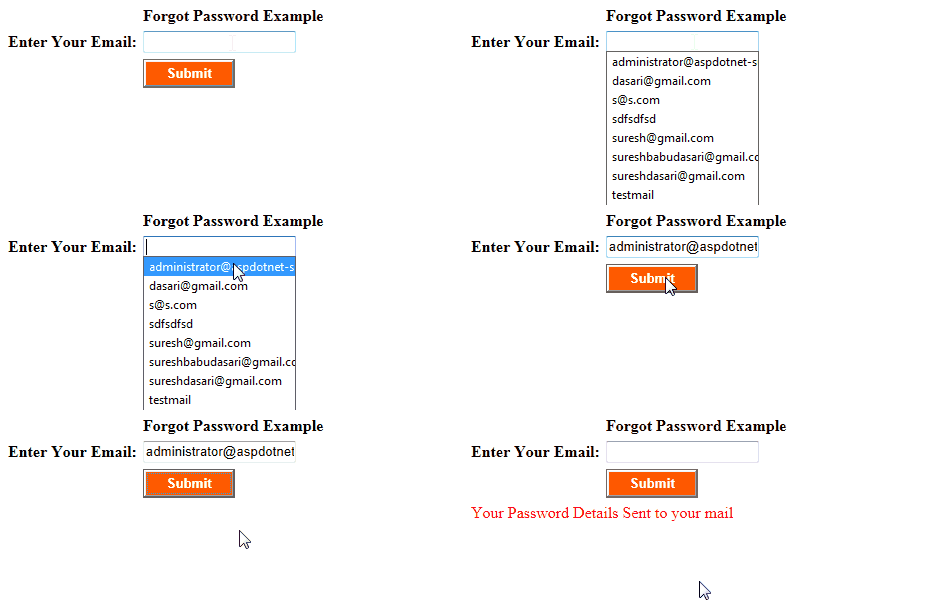 |
Download
Sample code Attached


|
If you enjoyed this post, please support the blog below. It's FREE! Get the latest Asp.net, C#.net, VB.NET, jQuery, Plugins & Code Snippets for FREE by subscribing to our Facebook, Twitter, RSS feed, or by email. |
|||
 Subscribe by RSS
 Subscribe by Email
|
|||


40 comments :
hi Suresh ji! good morning ! You r doing great job.I daily go through with your articles.
Actually sir,right now i m looking for a job change and everybody is asking WCF and MVC in interview.
Please teach us MVC and WCF and make us master in WCF and MVC as in your other articles like gridview,javascript etc..
highly thankful to you.
Vipin Kumar Pandey
your all articles r awesome!!
Hello suresh sir,
Please add one type of article that How to change Language dynamically in a website.
nice article suresh ji......
thank for provide nice article its very helpful for interview dapfor. com
Sir, My final B.Tech Final Year Project is "Mailing Website like Gmail" obiviously it will going to be a milestone in myproject but sir please guide me on how we send and receive mails if we have our own domain name like "abhinavsingh993@richmail.com" where rich mail is my domain name....Please....Please guide me on that ........now as usual you are simply great and hats off to your dedication and curiosity to explain ASP.NET at the end I am eagerly waiting for your next post....thank you sir
@Abhinavsingh993, simply replace google domain name with yours and put your own smtp server (ask your admin if you don't know it) instead of googles.
Nothing else is google specific, it's standard mailing code in .NET
thanks bhijan i love u teacher
Dear Sir,
Please Give Some easy Examples For Learning JavaScripts..
Thank You
while implementing this application i am getting error like you need 5.5.1 authentication required.
help me to avoid this error
i got an idea from this, thank you!
Nice One..
thank you so much
This code cannot be used in real life due to security (Sql Injection) and maintenance (Values that could be changed like connectionstring, smtp etc). For the people that could copy this code should bear this in mind.
Thnx sir for the code..
This code help me to code in my project...
please tech us MVC
Hi.
using (SqlConnection con = new SqlConnection("Data Source=SureshDasari;Integrated Security=true;Initial Catalog=MySampleDB"))
can i replace with
string connectionString = ConfigurationManager.ConnectionStrings["ConnectionString"].ConnectionString;
SqlConnection con = new SqlConnection(connectionString);
because I dont know how to declare the data source, integrated security and initial catalog.
Thank you
it seems that this article is written by a beginner, this should not be implement in real project. i just post some ideas.
1. store a unique key (salted or hash or encrypted) in database table while creating a user.
2. send an email link to the user login Email while submitting forgot password request. for example
http://www.domain.com/forgotpassword/key/acbd234sxw3y
3. confirm the link from user by clicking the link
4. match the link key with the stored key in database user table
5. show to reset password page.
This is the basic idea that should be implement in the real project.
Thank you.
Regards
zeex.programmer@yahoo.com
The SMTP server requires a secure connection or the client was not authenticated. The server response was: 5.5.1 Authentication Required.
hello sir i am little bit confused about these 2 lines.how could be txtEmail.Text is same for both.please explain.thank you
Msg.From = New MailAddress(txtEmail.Text)
Msg.[To].Add(txtEmail.Text)
it was very helpful! thanks
sir , if Same email id associate with multiple email then what happen ???? As this code allow same email id to the multiple user ????
thanku so much it is very useful in my project
Awesome......
really helpful peace of code....
my professor give me 10 out of 10 for this code...
thank you sooooo much
braavoooooooooo
100% working
can you please make some this kind of code that send someone FB password to our mail please
Plz send some Ajax file m. .zip file to my email id ..sir..
semlimustakin49@gmail.com
I typed exactly the same ..but i get error that value of email should scalar..please help me
1) System.Net.Mail.MailMessage mail = new System.Net.Mail.MailMessage("anjalijay@gmail.com", dr["email_id"].ToString(), "Reset Your Password", strBody.ToString());
2)System.Net.NetworkCredential mailAuthenticaion = new System.Net.NetworkCredential("anjalijay.com","cgp1234");
only this i chnaged in code but getting error that emailid must be scalar ...help me
sir i have a problum 5.5.1 authentication request how to solve this prob pls help me sir
sir i have a problum 5.5.1 authentication request how to solve this prob pls help me sir
hi sir pls tell me i had same problem in 5.5.1 authentication request how to solve this prblm pls sir i need...
Regards,
VEERA
i am not getting password on my email :(
Hi Sir I'm getting this error please help, even though i changed this https://myaccount.google.com/lesssecureapps
The SMTP server requires a secure connection or the client was not authenticated. The server response was: 5.5.1 Authentication Required.
thank you bro.....
your code is not work in my project....
"The SMTP server requires a secure connection or the client was not authenticated. The server response was: 5.5.1 Authentication Required. "
this error is occurred.
good article.....
Thank you for this...!!!
after clicking on submit button nothing is happening .wat to do?
Sir,
your code is not working in my project i gettting error any solutin.
i got exception error in this programm
Actually I'm Trying this asp.net code to server side application and i have got error
An attempt was made to access a socket in a way forbidden by its access permissions 74.125.24.108:587
please response my comment
Note: Only a member of this blog may post a comment.