
Introduction:
In this article I will explain how to search records in gridview and highlight search keywords in gridview using asp.net.

In this article I will explain how to search records in gridview and highlight search keywords in gridview using asp.net.
Description:
In Previous post I explained clearly about how to filter gridview records with dropdownlist selection. Now I will explain how to implement search functionality for gridview and highlight search keywords in gridview using asp.net.
In Previous post I explained clearly about how to filter gridview records with dropdownlist selection. Now I will explain how to implement search functionality for gridview and highlight search keywords in gridview using asp.net.
Here my requirement is I have a web page that contains Search textbox, button and gridview with some data now I want to display data in gridview whenever user enter text in textbox and hit search button after that I need to highlight that resultant keyword in gridview using asp.net. To implement this first design the table in database and give name UserInfomation
ColumnName | DataType |
UserId | Int(set identity property=true) |
UserName | varchar(50) |
LastName | varchar(50) |
Location | varchar(50) |
After completion table creation write some of css classes to change the appearance of gridview and design aspx page like this
<html xmlns="http://www.w3.org/1999/xhtml"> <head id="Head1" runat="server"> <title>Highlight the Search Keywords in Gridview </title> <style type="text/css"> .GridviewDiv {font-size: 100%; font-family: 'Lucida Grande', 'Lucida Sans Unicode', Verdana, Arial, Helevetica, sans-serif; color: #303933;} Table.Gridview{border:solid 1px #df5015;} .Gridview th{color:#FFFFFF;border-right-color:#abb079;border-bottom-color:#abb079;padding:0.5em 0.5em 0.5em 0.5em;text-align:center} .Gridview td{border-bottom-color:#f0f2da;border-right-color:#f0f2da;padding:0.5em 0.5em 0.5em 0.5em;} .Gridview tr{color: Black; background-color: White; text-align:left} :link,:visited { color: #DF4F13; text-decoration:none } .highlight {text-decoration: none;color:black;background:yellow;} </style> </head> <body> <form id="form1" runat="server"> <div class="GridviewDiv"> <p> Enter UserName : <asp:TextBox ID="txtSearch" runat="server" /> <asp:ImageButton ID="btnSearch" ImageUrl="~/SearchButton.png" runat="server" Style="top: 5px; position: relative" onclick="btnSearch_Click" /> <asp:ImageButton ID="btnClear" ImageUrl="~/Clearbutton.png" runat="server" Style="top: 5px; position: relative" onclick="btnClear_Click" /><br /> <br /> </p> <asp:GridView ID="gvDetails" runat="server" AutoGenerateColumns="False" AllowPaging="True" AllowSorting="true" DataSourceID="dsDetails" Width="540px" PageSize="10" CssClass="Gridview" > <HeaderStyle BackColor="#df5015" /> <Columns> <asp:TemplateField HeaderText="UserName"> <ItemTemplate> <asp:Label ID="lblFirstname" Text='<%# HighlightText(Eval("UserName").ToString()) %>' runat="server"/> </ItemTemplate> </asp:TemplateField> <asp:TemplateField HeaderText="LastName"> <ItemTemplate> <asp:Label ID="lblLastname" Text='<%# Eval("LastName") %>' runat="server"/> </ItemTemplate> </asp:TemplateField> <asp:TemplateField HeaderText="Location"> <ItemTemplate> <asp:Label ID="lblLocation" Text='<%#Eval("Location") %>' runat="server"></asp:Label> </ItemTemplate> </asp:TemplateField> </Columns> </asp:GridView> </div> <asp:SqlDataSource ID="dsDetails" runat="server" ConnectionString="<%$ConnectionStrings:dbconnection %>" SelectCommand="select * from UserInformation" FilterExpression="UserName LIKE '%{0}%'"> <FilterParameters> <asp:ControlParameter Name="UserName" ControlID="txtSearch" PropertyName="Text" /> </FilterParameters> </asp:SqlDataSource> </form> </body> </html> |
If you observe above code in header section I written css classes by using those we can change the appearance of gridview, highlight the search keyword by changing the background color and written code to bind gridview and used filter expressions to filter gridview based on search text
Now open code behind file and add following namespaces in code behind
C# Code
using System; using System.Text.RegularExpressions; using System.Web.UI; |
After completion of adding namespaces write the following code
// Create a String to store our search results private string SearchString = ""; protected void Page_Load(object sender, EventArgs e) { } public string HighlightText(string InputTxt) { string Search_Str = txtSearch.Text; // Setup the regular expression and add the Or operator. Regex RegExp = new Regex(Search_Str.Replace(" ", "|").Trim(), RegexOptions.IgnoreCase); // Highlight keywords by calling the //delegate each time a keyword is found. return RegExp.Replace(InputTxt, new MatchEvaluator(ReplaceKeyWords)); } public string ReplaceKeyWords(Match m) { return ("<span class=highlight>" + m.Value + "</span>"); } protected void btnSearch_Click(object sender, ImageClickEventArgs e) { // Set the value of the SearchString so it gets SearchString = txtSearch.Text; } protected void btnClear_Click(object sender, ImageClickEventArgs e) { // Simple clean up text to return the Gridview to it's default state txtSearch.Text = ""; SearchString = ""; gvDetails.DataBind(); } |
VB.NET Code
Here don’t forgot to set the connection string in web.config file here I am getting database connection from web.config file for that reason you need to set the connectionstring in web.config file like this
Imports System Imports System.Text.RegularExpressions Imports System.Web.UI Public Class _Default Inherits System.Web.UI.Page ' Create a String to store our search results Private SearchString As String = "" Protected Sub Page_Load(ByVal sender As Object, ByVal e As EventArgs) End Sub Public Function HighlightText(ByVal InputTxt As String) As String Dim Search_Str As String = txtSearch.Text ' Setup the regular expression and add the Or operator. Dim RegExp As Regex = New Regex(Search_Str.Replace(" ", "|").Trim, RegexOptions.IgnoreCase) ' Highlight keywords by calling the 'delegate each time a keyword is found. Return RegExp.Replace(InputTxt, New MatchEvaluator(AddressOf ReplaceKeyWords)) End Function Public Function ReplaceKeyWords(ByVal m As Match) As String Return ("<span class=highlight>" + m.Value + "</span>") End Function Protected Sub btnSearch_Click(ByVal sender As Object, ByVal e As ImageClickEventArgs) ' Set the value of the SearchString so it gets SearchString = txtSearch.Text End Sub Protected Sub btnClear_Click(ByVal sender As Object, ByVal e As ImageClickEventArgs) ' Simple clean up text to return the Gridview to it's default state txtSearch.Text = "" SearchString = "" gvDetails.DataBind() End Sub End Class |
<connectionStrings> <add name="dbconnection" connectionString="Data Source=SureshDasari;Integrated Security=true;Initial Catalog=MySampleDB"/> </connectionStrings> |
Demo
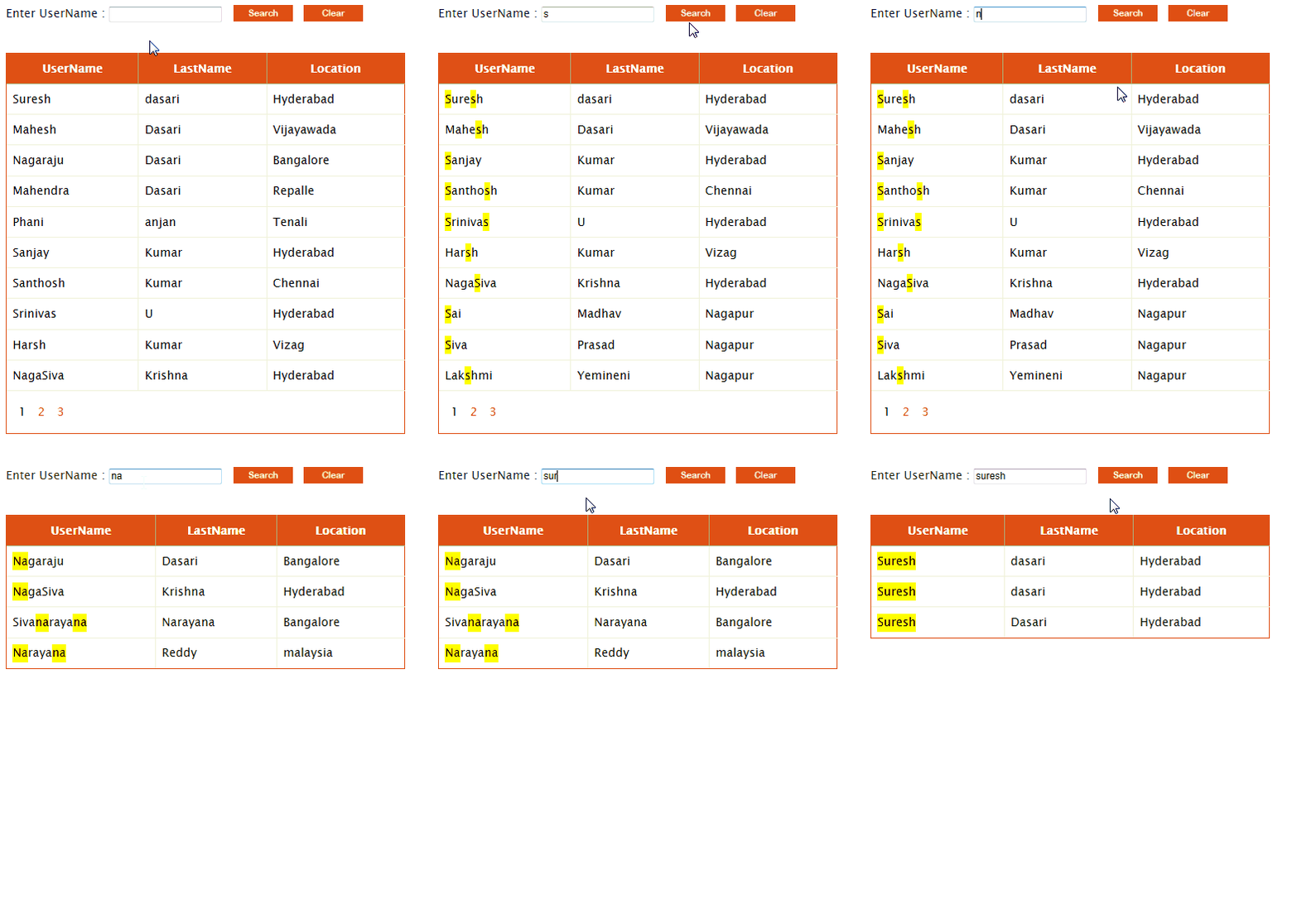 |
Download sample code attached


|
If you enjoyed this post, please support the blog below. It's FREE! Get the latest Asp.net, C#.net, VB.NET, jQuery, Plugins & Code Snippets for FREE by subscribing to our Facebook, Twitter, RSS feed, or by email. |
|||
 Subscribe by RSS
 Subscribe by Email
|
|||


72 comments :
Great work sir, I am searching for this code from long time..thnx
Very Easy and useful way for my Difficulty
Thanks sir for ur valuable guidenace
thank u sir greate work.........,
What if your column you're searching for has spaces? How would you return that value?
Very Very Nice Site. Excellent Work Done.
Thanks Team of Aspdotner-suresh.com web
hello sir,
wil u plz make the same project with the help of datareader. i need it in my project
Very nice!!! Great work
superb site.....it very useful site for all ...
Thanks to suresh.
Awesome!! Thanks so much for the useful info. :)
Am i missing something here? Because when i click my search button im not getting anything?
I did not get anything either.
Eugene
nice post suresh.
how to hight light bound field meand 'Datafield" in gridview
how to hight light bound field meand 'Datafield" in gridview
hi sir ....
It is not working
it just display all data from database
and not highlight any row when i am search....
@Chetan patil...
Check your code I hope you did mistake in highlight text method.
hi sir.....
how to use this article in asp.net with mvc .
please help me
owsome thanks bro
This is great suresh. Any idea how can i highlight the whole row instead? Thanks in advance.
Hi, thanks for sharing this..by the way, how about multiple search text fields?I'm having prob with it.
Thanks
Thank you very much for supporting the new programmers. Most of the posting helps me a lot, n' i hope its same with most of others..
Bikalpa Nepal
Simple and useful, thanks!
i want it windows application vb.net can u guys help me out
i want it windows application vb.net can u guys help me out
Hello Sir,
Sir can you please help me i am writing code to search the files in a folder with keyword search if i have 100 doc file in the search textbox if i enter the word java, C# i need to get only those doc file which has java C# in it. i have done little coding but its displaying all files which is there in folder not the.
Hi Suresh,
Can tell me example on Gridview
Display two tables data in a single gridview,
Not for all clolumns data some columes only
That tables are PK and FK relation)
(or)
With out relation also
Plz give me example on this
Hi Suresh,
Can you help me in scrolling images
using jquery with asp.net and c#
Hello Sir i need this code with Datasource not with Datasourceid can you please show me that i need that urgent my all connection has done with datacourse
OnClicking back button, the highlighted text is not losing its style, the highlighted text still gets displayed.
hot to write it using C#???
if i use two or three textbox to find result then what should i do
SUBASH
Sir, I want to filter rows in grid view using mobile number on text Changed events plz help me
Great Work ........Found this
How it will work to search in last name and Location also
Thanks sir
for guidenace
Hi,
I took same GridView & one View button. If we clicks on view button, the data in this row should be displayed in respective textbox controls. Is there any way for Row_command event of Gridview ??
Pls help me out...
Thanks in Advanced
Sumit...
It is as great and simple like you, You are such a champion coder.
very nice
Can i have this code in vb.net
Hi Suresh,
How to search the Username or last name ,
If I enter Username or last in txtSearch.Text name result has to Highlight.
Please tell me .
pls tell me how to apply filters for each row in grid in c# window application....urgent
Dear Sir,
So can we run or make this program without asp.net Because i prefer not to use with websit.
Kind regards,
Kalunche
Great Work...Thank you so much.. keep it up.
Nice One
How would we filter with more that 1 column. For example, what if I want the capability to filter the results using either the username or the last name?
i have got the error as:--- "The name 'Bind' does not exist in the current context int the line- "
please help me out asap????
Please bind grid view data from aspx.cs page then how it possible this search please suggest me.
I don't want to bind data using this....
please please please....
How Can we Use in this ..Autogenrated Edit or delete buttons
Mr. suresh. do you want to develop web application for my company.
please email on jeddyviquar@yahoo.com
I want images as search result.How to get it?
Thanku for gud & simple coding suresh ji
return span class=highlight>" + m.Value + "span
this is not working
sir its not working, i am facing one error
Server Error in '/GridviewWithSearch' Application.
Invalid object name 'UserInformation'.
Description: An unhandled exception occurred during the execution of the current web request. Please review the stack trace for more information about the error and where it originated in the code.
Exception Details: System.Data.SqlClient.SqlException: Invalid object name 'UserInformation'.
Source Error:
An unhandled exception was generated during the execution of the current web request. Information regarding the origin and location of the exception can be identified using the exception stack trace below.
Stack Trace:
Dear Sir,
can u help me plz...
I want code for searching on grid view COLUMN WISE using only jquery (NOT WRITE ON ANY .NET CODE)
Dear Sir,
I have one `grid view` with 4 columns like
FromAddress ToAddress Subject Password
=========== ========== ======= ========
Now Search the `grid view` From Column Wise Depends up on Particular `TextBox` that means I have Four `TextBox's` For Four `Grid-view` columns.
My main requirement is if we enter the FromAddress like srinivas@gmail.com in FromAddress TextBox at that time search the first column and then find any value in that column that values are highlight and at the same time I entered data as veeru@gmail.com in SECOND COLUMN ToAddress then find the values from filtered data in gridview using only jquery AND KEYUP().
**RESTRICTION**:WHEN EVER SEARCHING DATA IN GRID VIEW DONT'T CONNECT WITH DATABASE ALSO.
This is possible or not with gridview
Thank You.
If text isn't found in current gridview , how can i popup the window as "Text Not Found" with highlighted text?
Thanks !
Hello Sir,
I have a problem in my project i want to show the user's data when he login only his data retrive from database according to his username and display in a gridview after a login page...
please post the code its urgent.
dear sir i request you to also add the database file with your code.so that new users can find it easy to understand.as some of them direct copy paste code and debug it and can understand it and implement it in their project.thank you
this article is as great as ever
How to open a website in one network only.
Restricted in outside network.
hi Suresh first of all thank you for your contribution in dot net.
here i need favour that same above code on key press event .
Thank you in advance.
Thank you so much. very usefull, working fine 100% :))))
not working even the css has not been loaded, don't know where m wrong.. #help_please
i have done but the selected parts are not highlighted
How we done the same functionality on Keypress
May u forget to write CSS of highlight text
hii sir i want code of searching many in textbox with a sepperator of comma,and dispalying them in grid view
Dear suresh,
Will you please filter if that exists in any of all the columns. and the columns also generating dynamically. so we don't know the column names also. please work on that.
Hello sir
I want to show all records of particular employee based on entered employeeid in textbox and all record should come in respect to textbox for updating. can you guide me for this
Amazing.. It worked.. thanks.
Note: Only a member of this blog may post a comment.