
Introduction:
Here I will explain how to solve the Service on local computer started and then stopped, some services stop automatically if there are not in use by other services or programs
Description:
In previous article I explained clearly how to create windows service and how to run windows service in scheduled intervals and how to install windows service in system. In my system I tried to install windows service completion writing the code but at that time I was unable to install windows service I got error like this
In previous article I explained clearly how to create windows service and how to run windows service in scheduled intervals and how to install windows service in system. In my system I tried to install windows service completion writing the code but at that time I was unable to install windows service I got error like this
“The Service on local computer started and then stopped ,Some services stop automatically if there are not in use by other services or programs.”
 |
Now I will explain how to solve the Service on local computer started and then stopped, some services stop automatically if there are not in use by other services or programs.
To solve this problem we have two ways
First Way
Start --> Run --> Type Services.msc and click enter button now you will get all the services in your computer after that select your service and right click on that and go to Properties
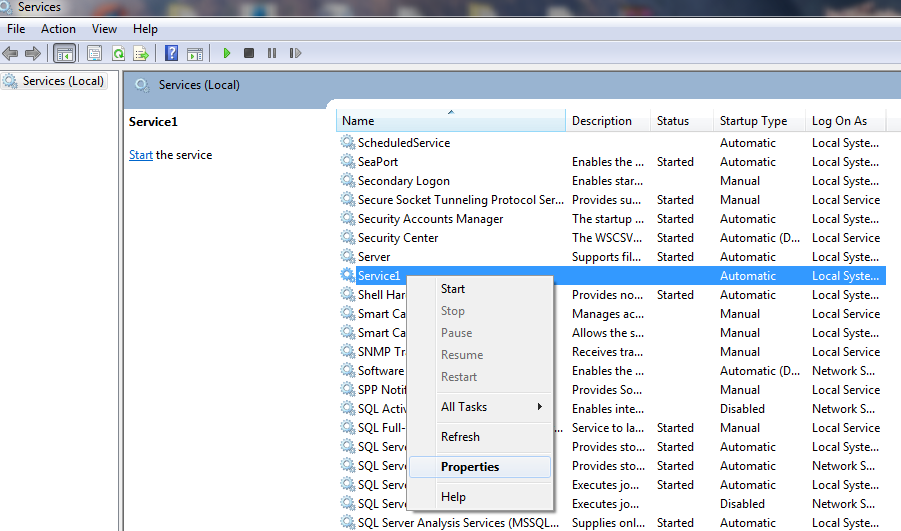 |
After that open Select Log On tab in that select Local System Account and click ok now your problem will solve
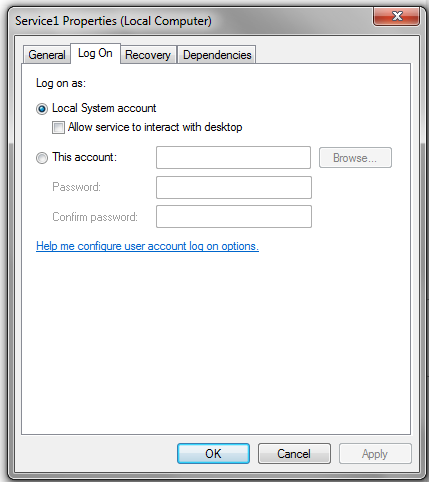 |
Otherwise check second way.
Second Way
First right click on My Computer and select Manage now computer management window will open
In that window select Application log and right click on it and select properties now another window will open in that change maximum log size to bigger value and check Overwrite events when needed

|
If you enjoyed this post, please support the blog below. It's FREE! Get the latest Asp.net, C#.net, VB.NET, jQuery, Plugins & Code Snippets for FREE by subscribing to our Facebook, Twitter, RSS feed, or by email. |
|||
 Subscribe by RSS
 Subscribe by Email
|
|||


40 comments :
Good Suresh......:)
@mis solutions
Please don't post spam comments
@Priyanshu
Please don't post spam comments
can you please help me whhy i am gettign this error
Windows could not start the Documentservice on local computer
Error 1053: the service didnot respond to the start or control request in a timely fashion
here Documentservice is my window service name
can you please help me whhy i am gettign this error
Windows could not start the Documentservice on local computer
Error 1053: the service didnot respond to the start or control request in a timely fashion
here Documentservice is my window service name
Guys no need of looking into logs and all
just put VIA protocol disabled from configuration manager. And try with restarting those services..
more details at
www.parigh.com
please check the properties of service
I have done the same thing but its not working still the same error when i check the appl log file it shows the below error
Service cannot be started. System.Configuration.ConfigurationErrorsException: The binding at system.serviceModel/bindings/netTcpBinding does not have a configured binding named 'TCPBindingBasicExample.WCFServiceHost.MyServiceBehaviour'. This is an invalid value for bindingConfiguration. (E:\My-VS-Project\TCPBindingBasicExample\WCFServiceHost\bin\Debug\WCFServiceHost.exe.Config line 44)
at System.Configuration.BaseConfigurationRecord.EvaluateOne(String[] keys, SectionInput input, Boolean isTrusted, FactoryRecord factoryRecord, SectionRecord sectionRecord, Object parentResult)
at System.Configuration.BaseConfigurationRecord.Evaluate(FactoryRecord factoryRecord, SectionRecord sectionRecord, Object parentResult, Boolean getLkg, Boolean getRuntimeObject, Object& result, Object& resultRuntimeObject)
at System.Configuration.BaseConfigurationRecord.GetSectionRecursive(String configKey, Boolean getLkg, Boolean checkPermission, Boolean getRuntimeObject, Boolean requestIsHere, Object& result, Object& resultRuntimeObject)
at Sys...
have any idea ??
this solution doesn't work for me...Any one with other solution????????????
Service cannot be started. System.Web.HttpException: The transport failed to connect to the server.
---> System.Reflection.TargetInvocationException: Exception has been thrown by the target of an invocation. ---> System.Runtime.InteropServices.COMException (0x80040213): The transport failed to connect to the server.
--- End of inner exception stack trace ---
at System.RuntimeType.InvokeDispMethod(String name, BindingFlags invokeAttr, Object target, Object[] args, Boolean[] byrefModifiers, Int32 culture, String[] namedParameters)
at System.RuntimeType.InvokeMember(String name, BindingFlags bindingFlags, Binder binder, Object target, Object[] providedArgs, ParameterModifier[] modifiers, CultureInfo culture, String[] namedParams)
at System.Type.InvokeMember(String name, BindingFlags invokeAttr, Binder binder, Object target, Object[] args, CultureInfo culture)
at System.Web.Mail.SmtpMail.LateBoundAccessHelper.CallMethod(Type type, Object obj, String methodName, Object[] args)
at System.Web.Mail.SmtpMail.LateB...
super :) it worked...
Not working for me,it is still showing same message
not working for me as well.
First way worked perfectly. Thank you!
Thanks Suresh... helpful !!
Still am getting these error i have done those two steps
The Service on local computer started and then stopped ,Some services stop automatically if there are not in use by other services or programs
This not work for me........
i check 2 way but not work .........some message display .....
“The Service on local computer started and then stopped ,Some services stop automatically if there are not in use by other services or programs.”
how to solve plz help me......
Neither solution worked for me. 0/2
sorry to say sir both methods don't worked .....plz suggest the solution to this error
I have written a email code in windows service.
Without email code it is working very well but when I am using email code then it is showing the same error. I have already tried both above solution but still there is problem. Please help me. below is the code...
using System;
using System.Collections.Generic;
using System.ComponentModel;
using System.Data;
using System.Diagnostics;
using System.Linq;
using System.ServiceProcess;
using System.Text;
using System.IO;
using System.Timers;
using System.Net;
using System.Net.Mail;
using System.Data.SqlClient;
namespace WinEmailService
{
public partial class EmailScheduleService : ServiceBase
{
Timer timer = new Timer();
public EmailScheduleService()
{
InitializeComponent();
}
protected override void OnStart(string[] args)
{
//add this line to text file during start of service
TraceService("start service");
//handle Elapsed event
timer.Elapsed += new ElapsedEventHandler(OnElapsedTime);
//This statement is used to set interval to 1 minute (= 60,000 milliseconds)
timer.Interval = 60000;
//enabling the timer
timer.Enabled = true;
}
protected override void OnStop()
{
timer.Enabled = false;
TraceService("stopping service");
}
private void OnElapsedTime(object source, ElapsedEventArgs e)
{
TraceService("Another email send at " + DateTime.Now);
}
private void TraceService(string content)
{
//set up a filestream
FileStream fs = new FileStream(@"d:\EmailSendTest.txt", FileMode.OpenOrCreate, FileAccess.Write);
//set up a streamwriter for adding text
StreamWriter sw = new StreamWriter(fs);
//find the end of the underlying filestream
sw.BaseStream.Seek(0, SeekOrigin.End);
//add the text
sw.WriteLine(content);
//add the text to the underlying filestream
sw.Flush();
//close the writer
sw.Close();
SmtpClient m = new SmtpClient("smtp.rediffmailpro.com");
m.Port = 587;
m.UseDefaultCredentials = true;
MailAddress To = new MailAddress("impraveen26@gmail.com");
MailAddress From = new MailAddress("abc@gmail.com");
MailMessage mm = new MailMessage(From, To);
mm.Subject = "Automatic mail--- Testing -----";
mm.IsBodyHtml = true;
mm.Body = "Testing......";
m.Credentials = new System.Net.NetworkCredential("abc@gmail.com", "password");
m.DeliveryMethod = SmtpDeliveryMethod.Network;
m.Send(mm);
}
}
}
I also have the same prob, can some one please help me out?
nice post sir ur post is very helpfull for me every time
have a same problem and cannot fix it
I have got same problem and used your solution for it. But it is not solve. please help me asap.
Thank you.
helpfulllllll (Y)
It's not working..:(
I tried both options still facing the same issue. even i am logged in with administrator account.
I have tried both ways but not working showing same error with reason in log event
The installation if sql server agent is disable the edition of sql server that installed this service does not support sql agent
windows 7 users ->Right Click on "MyComputer" ->Manage->System Tools -> Windows Logs ->Application
if you have any error in window service will show there
double click on error will get exact problem!!!
Very Helpful
Check port number in IIS whether it is already consumed by other service or not. If yes then Stop that and then try to start your service.
:- sandeshsalunke55@gmail.com
while installation the folder paths should not have blank spaces , it works perfectly.
This is possibly shown when system do not have enough memory hence you need to alter the Xmx and Xms parameters. This is also possible if system do not have enough space in the hard disk. This can also happen if the service needs to be started from administrator privilege hence you need to give logon of the particular user
Not working for me,it is still showing same Message
super :) it worked
Note: Only a member of this blog may post a comment.