
Introduction:
Here I will explain what windows service is, uses of windows service and how to create windows service in c#.
Description:
Today I am writing article to explain about windows services. First we will see what a window service is and uses of windows service and then we will see how to create windows service.
Now the service is installed. To start and stop the service, go to Control Panel --> Administrative Tools --> Services. Right click the service and select Start.
Now the service is started, and you will be able to see entries in the log file we defined in the code.
Now open the log file in your folder that Output of the file like this
Here I will explain what windows service is, uses of windows service and how to create windows service in c#.
Description:
Today I am writing article to explain about windows services. First we will see what a window service is and uses of windows service and then we will see how to create windows service.
What is Windows Service?
Windows Services are applications that run in the background and perform various tasks. The applications do not have a user interface or produce any visual output. Windows Services are started automatically when computer is booted. They do not require a logged in user in order to execute and can run under the context of any user including the system. Windows Services are controlled through the Service Control Manager where they can be stopped, paused, and started as needed.
Creating Windows Service is very easy with visual studio just follow the below steps to create windows service
Create a Windows Service
Creating Windows Service is very easy with visual studio just follow the below steps to create windows service
Open visual studio --> Select File --> New -->Project--> select Windows Service
And give name as WinServiceSample
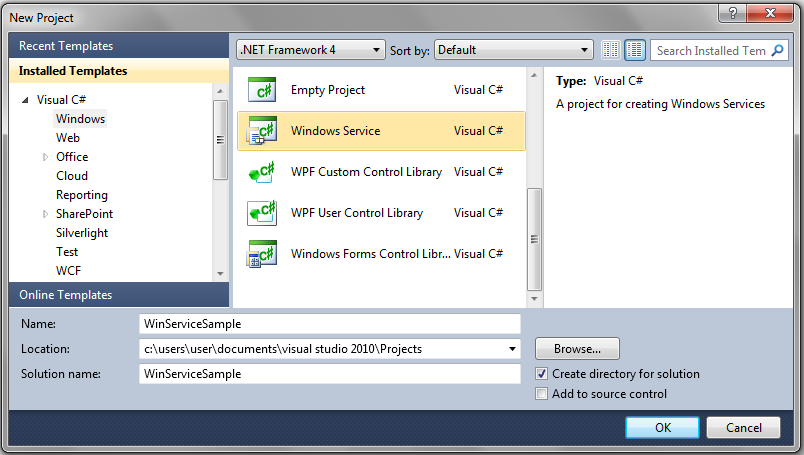 |
After give WinServiceSample name click ok button after create our project that should like this
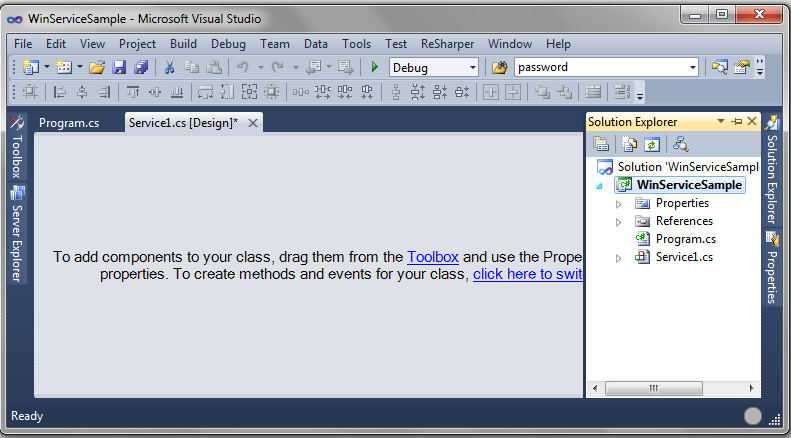 |
In Solution explorer select Service1.cs file and change Service1.cs name to ScheduledService.cs because in this project I am using this name if you want to use another name for your service you should give your required name.
After change name of service open ScheduledService.cs in design view right click and select Properties now one window will open in that change Name value to ScheduledService and change ServiceName to ScheduledService. Check below properties window that should be like this
 |
After change Name and ServiceName properties again open ScheduledService.cs in design view and right click on it to Add Installer files to our application.
The main purpose of using Windows Installer is an installation and configuration service provided with Windows. The installer service enables customers to provide better corporate deployment and provides a standard format for component management.
After click on Add installer a designer screen added to project with 2 controls: serviceProcessInstaller1 and ServiceInstaller1
Now right click on serviceProcessInstaller1 and select properties in that change Account to LocalSystem
 |
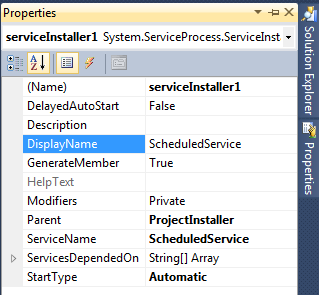
After set those properties now right click on ServiceInstaller1 and change following StartType property to Automatic and give proper name for DisplayName property
 |
After completion of setting all the properties now we need to write the code to run the windows services at scheduled intervals.
If you observe our project structure that contains Program.cs file that file contains Main() method otherwise write the Main() method like this in Program.cs file
/// <summary> /// The main entry point for the application. /// </summary> static void Main() { ServiceBase[] ServicesToRun; ServicesToRun = new ServiceBase[] { new ScheduledService() }; ServiceBase.Run(ServicesToRun); } |
After completion of adding Main() method open ScheduledService.cs file and add following namespaces in codebehind of ScheduledService.cs file
using System.IO; using System.Timers; |
If you observe code behind file you will find two methods those are
protected override void OnStart(string[] args) { } protected override void OnStop() { } |
We will write entire code in these two methods to start and stop the windows service. Write the following code in code behind to run service in scheduled intervals
//Initialize the timer Timer timer = new Timer(); public ScheduledService() { InitializeComponent(); } //This method is used to raise event during start of service protected override void OnStart(string[] args) { //add this line to text file during start of service TraceService("start service"); //handle Elapsed event timer.Elapsed += new ElapsedEventHandler(OnElapsedTime); //This statement is used to set interval to 1 minute (= 60,000 milliseconds) timer.Interval = 60000; //enabling the timer timer.Enabled = true; } //This method is used to stop the service protected override void OnStop() { timer.Enabled = false; TraceService("stopping service"); } private void OnElapsedTime(object source, ElapsedEventArgs e) { TraceService("Another entry at "+DateTime.Now); } private void TraceService(string content) { //set up a filestream FileStream fs = new FileStream(@"d:\ScheduledService.txt",FileMode.OpenOrCreate, FileAccess.Write); //set up a streamwriter for adding text StreamWriter sw = new StreamWriter(fs); //find the end of the underlying filestream sw.BaseStream.Seek(0, SeekOrigin.End); //add the text sw.WriteLine(content); //add the text to the underlying filestream sw.Flush(); //close the writer sw.Close(); } |
If you observe above code in OnStart method I written event ElapsedEventHandler this event is used to run the windows service for every one minute
After completion code writing build the application and install windows service. To install windows service check this post here I explained clearly how to install windows service and how to start windows service.
Now the service is started, and you will be able to see entries in the log file we defined in the code.
Now open the log file in your folder that Output of the file like this
 |

|
If you enjoyed this post, please support the blog below. It's FREE! Get the latest Asp.net, C#.net, VB.NET, jQuery, Plugins & Code Snippets for FREE by subscribing to our Facebook, Twitter, RSS feed, or by email. |
|||
 Subscribe by RSS
 Subscribe by Email
|
|||


108 comments :
Gooood Article Suresh
Thanks Mehtab Keep visiting...
I always visit your site.....keep it up Suresh..:)
nice Article suresh
can we schedule our application daily on specific time using win services.
thank you
hi rajesh,
here if you observe this windows service will run for every one minute based on that you can adjust your time it will work for you
thanks and keep it up
Hi in my windows service in the onstart method im writing some data from one text file to other text file. so lets say it runs for every 5 mins i.e it keeps on checking for files in the dir every five min and then process...
so w.r.t to your above code done i need to write the same code in OnElapsedTime or is it fine if its just in onstart method(since after every 5 min the service starts from onstart method?
it's ok you can write your code in onstart method it will work for you. if you observe above code i used onstart method it will run for every one minute
Easy and informative samples.. thanks
Helpful article, thanks.
Thanks
Suri
Nicely Explained...KEEP IT UP :)
Hi suresh how r u...? your explaination is very nice...keep it up:)
nice example..
but i think u forgot to start the timer after assigning interval
sorry i missed that line
its really very help full............
thanks suresh garu..............
Hi sir,
Please Answer this if you know My requirement is like this " I have folder in System when images copied into that folder that images names automatically inserted into database.
How can I do th is?
Regards
VeerendraNadh
@VeerendraNadh...
if your using application to save images in folder check this link
http://www.aspdotnet-suresh.com/2011/03/how-to-save-images-into-folder-and.html
if your directly copying the images into folder then you need to insert image names automatically into database then you need to write windows service to check all the images in folder and save those names in database
Thank you. really nice article.
excellent share!
Great post. Very interesting to see. I usually do not read blog, but this post definatelly caught my attention.
Nice work, is there a way to log as user, giving the username and password.
very nice article,
thanks for sharing...
keep it up well done nicely explained
hi suresh sir, this is very easy to learn to newer. very nice explanation.
sir my requirement is i have to insert record from one table to another table at particular interval. please answer if any solution/idea
thanks
Thank You!! :) Its really great suresh...
nice article
gr8 Suresh... ths article really helped me a lot..
hey iam using windows service to insert record from one to another table on particular interval but it eats lots of memory when i run ths service under services.msc... any solution to flush the memory used by ths service.Thanks!
Hi, This tutorial is relay helpful. But I want to read data from access DB using timer. I write code in OnElapsedTime() and also try onStart() but still got error. It was "the service on local computer started and then stopped. some services stop automatically...". Please tell me what's the problem. I clear my log file also and googling lot of blogs. Please help me.
suresh can u tel me how to send automatic email notification on weely bases or daily for multiple recipients ....
Thanks ! Good post suresh
Hi Suresh,
I want to implement timer in asp.net
so that user can see how much time is left for his test to complete
I want to set timer for 30 mins to complete online test.
can you please help me ?
I created a server in C# with the services it provides furnished
as a
WellKnownServiceTypeEntry,
and used
System.Runtime.Remoting.RemotingConfiguration.RegisterWellKnownServiceType()
to make it available to clients over the network.
It works fine when the server is made as a console application, but doesn't work when the server is made as a Windows service. Please advise.
The Windows service runs as LocalSystem, was created in Visual Studio 2012. Firewall has been disabled.
Gud 1
Hi sir
In Windows service, how to display popup alert or system tray alert. Please give some ideas sir
nice... simple & clear
SIR,
my project has a module of silent remote installation of software on client machine from server. consider that the installation on client is going on from server and suddenly the server goes down and client is no more reciving any traffic from server then i want to write a service onto client machine that will continuously keep on analyzing the traffic coming from server and when it recieves no packets from server it should call recovery routine i.e resend the request to server to start the fresh installation.....
can u plz help me out with code for this service or guide for it.....
plz take my request into consideration and help me out at soonest...
Thank you.
Hi,Suresh
Very Nice and Impressive artical for begginers.
Now, I want to execute the stored procedure for every 5minutes which have the one out put parameter. So that where i need the call the procedure from the above code.
please help
thnaks in advance
Srikanth
very Good Support My Heart Full Thanks By KANNAN
hello sir,
i created one GUI application, now i want that application run as windows service.. meaning it should start when system is started , how to make my application run as i told above??
regards,
harini bangalore
this is very useful information
Hi suresh,
Nice blog.. really helped me out
vidur:nice one
Now Its Working fine...Thanks..
Very useful , your site willing to learn new stuff. Thank you.
its really very help full...
but I want to take backup of my database Every Day ,I need to write Windows Service,Give Code for that in C# . please...
thanks
Thanks so much for sharing.
Hai!! Thanks alot for your articles..:)God Bless
my requirement is: create windows service to run daily ONCE c#, fetch records from DB and export records to excel and send email that excel as a attachment. Please do the needful.
HI Suresh,
Could u please explain how to debug window service by step by step.
Thanks in adv.
-MadhuKrishna
Hi Suresh,
It was a wonderful tutorial. I had just one problem. Service couldn't write to text file. Although same code worked in Windows Form Application. Please help me out.
Thanks
Error 2 Unable to copy file "obj\x86\Debug\WindowsService1.exe" to "bin\Debug\WindowsService1.exe". The process cannot access the file 'bin\Debug\WindowsService1.exe' because it is being used by another process. WindowsService1
Gaurav Sharma Please help the solve the error
hi suresh...
I am getting Bad image format exception at the time of installation what i have to do pls help me..
sir i have made service build it and also run it
it is displayed in the list of the services but sir when i start the service in will give give the error "Could Not Start the Winservice service on local computer
Error 1067: the process terminated Unexpectedly."
my service name is Winservice
sir whats gone wrong ?
Hi Suresh...Nice article....I want to ask can we use this for ASP.NET application? Means I want to ask that consider a web page or application that is using windows service for printing tasks..
thanks and regards
Archit
Good article...! Neatly explained..
how do i get the user's entry out time automatically???? for example : like LOGIN time and LOGOUT time...
how do i get the user's entry out time automatically???? for example : like LOGIN time and LOGOUT time...
Hello Sir i have problem in start the service...my code is...
-------------------------------------------------------------------------------------------------------
using System;
using System.Collections.Generic;
using System.ComponentModel;
using System.Data;
using System.Diagnostics;
using System.Linq;
using System.ServiceProcess;
using System.Text;
using System.IO;
using System.Timers;
namespace Database_Configuration_Wizard
{
partial class DBConfigService : ServiceBase
{
Timer timer = new Timer();
MsAccess acce = new MsAccess();
public DBConfigService()
{
InitializeComponent();
}
//public void onCall()
//{
// this.OnStart(null);
//}
protected override void OnStart(string[] args)
{
this.GetData();
timer.Elapsed += new ElapsedEventHandler(OnElapsedTime);
timer.Interval = 10000;
timer.Enabled = true;
// TODO: Add code here to start your service.
}
private void OnElapsedTime(object source, ElapsedEventArgs e)
{
GetData();
}
public DataTable GetData()
{
DataTable data = new DataTable();
acce.testConn(Properties.Settings.Default.ConnString);
data = acce.getTable("SELECT Employee_Info.EmpName, RFID_ATTEN.EnteryDate, RFID_ATTEN.RFIDReaderIp FROM Employee_Info INNER JOIN RFID_ATTEN ON Employee_Info.EmployeeId = RFID_ATTEN.EmployeeId");
acce.testConn(Properties.Settings.Default.DBbackup);
foreach (DataRow row in data.Rows)
{
int i = acce.excuteQuery("INSERT INTO Attendances ([employee_code],[name_date],[action_event]) VALUES ('" + row[0] + "','" + row[1] + "','" + row[2] + "')");
}
return data;
}
protected override void OnStop()
{
timer.Enabled = false;
// TODO: Add code here to perform any tear-down necessary to stop your service.
}
}
}
please give suggestion asap....
thanks in advance....
Hi,
Currently i do have a requirement to develop a console based windows application which will check the status of all scheduled jobs scheduled in windows task scheduler and based on the job status it will fire email .
Anyone have any idea on this please.
Many Thanks,
Sisir
Hi,
I do have requirement which is of two parts :
1.Need to schedule a job in remote machine.Get all scheduled jobs in windows task scheduler and check the status of them.
2.Send alert email based on the job status(whether ran successfully or failed),
Any suggestion on this please.
Many Thanks,
Sisir
Hi,
can you tell me how to send email automatically in windows application based on the date specified in database.
ie,database table named sponser has 2 columns named sponsershipdate and type,by comparing these two values i have to send email automatically
Thanks you very much suresh.You article helped me to create a service easily and quickly.Keep it up.
hi suresh is there any method in .net start ,stop ,restart services in system tray .
Sir, This is Abhinav Singh 993 , Sir, whenever I am in problem I just view your website and my problem gets solved.
by reading the time from the database based on the time value the windows service has to run. how to do can u please help me?
Hi sir I have one requirement.
Actually I have one requirement.
in database there is one table called device table.there is one column called flag.
I will have to create one windows service which will be monitoring the table ,the work for the service will be if the flag is false for 1 hour then it will turn it to true.
Hi, I did same steps as above. But i couldn't find my service name in services(control panel). Could any one please help me
hi sir i want to disply Messagebox in a windows Service .... can we....???? please....help me...
hello sir I want to to the following.....
Create a DB having Price & Currency table. Price & Currency tables will be linked using referential constraint for the key CurrencyID (PK in Currency table). Price table will have Prices (Bid rate & Offer rate) of currencies for the different time stamps. For this, write a window service that will insert random prices for all the currencies in every 60 secs
Thanks
hello sir,
in a window service there is a function with try catch and i want that if exception generates than the value should be save into the database so plz guide me.
because in exception part function is not called.
can i call a method in exception part in window service????
sir,
please tell me, how to call windows service on hosting site or is it possible or not.
Hi Suresh how to save Backup files from DB in folder on Button Click in C# code
can u pls suggest me or help me
Excellent articles all urs...
i need help on windows 8 app development please start a section on windows store app development using c# .
Hi suresh,
this is really nice article thank you very much for your help.
now i want execute this service on every day at 8 am only so is it possible ??
now what happens suppose my computer restart then service start automatic at whichever time but i want it run at specific time
please help
beleave me suresh ur way of explanation is very very excellent with screen shots and samples,downloads..carry on ur good work
hi suresh
i need your help some prblem in intervals time in timer with write trace file
this my tracefile code. my prblem was trace file write function not properly work include end of post
private void tracefile(string content)
{
FileStream fs = new FileStream(@"D:\logingdetails.txt", FileMode.Open, FileAccess.Write);
StreamWriter sw = new StreamWriter(fs);
sw.BaseStream.Seek(0, SeekOrigin.End);
sw.WriteLine(content);
sw.Flush();
sw.Close();
}
this my event handler
private void time_Elapsed(object sender, ElapsedEventArgs e)
{
tracefile("Another Login :: " +DateTime.Now);
time.Stop();
}
this my onstart() funtion
protected override void OnStart(string[] args)
{
time.Interval = 6000;
time.Enabled = true;
time.Elapsed += new ElapsedEventHandler(time_Elapsed);
}
this my program.cs code
if(System.Diagnostics.Debugger.IsAttached)
{
Schdservice myser = new Schdservice();
string[] arg = new string [] {"agrs1","args2"};
myser.startdebub(arg);
System.Diagnostics.Debugger.Break();
myser.stopdebub();
}
logfile data
Service Start
Another Login :: 10/25/2013 5:27:44 PM
Another Login :: 10/25/2013 5:33:49 PM
Service Stopped
help me
thank in advance
Hi Suresh.. This Is Raffi Your Code Work as Best but If Any Developer want particular time like 10 AM , every day fire time interval for that time we need this kind stuff in real time
protected override void OnStart(string[] args)
{
//add this line to text file during start of service
TraceService("start service");
//handle Elapsed event
//ElapsedEventHandler this event is used to run the windows service for every 24 Hours
timer.Elapsed += new ElapsedEventHandler(OnElapsedTime);
int hours = Convert.ToInt32(ConfigurationSettings.AppSettings["DailyEventTriggerTime"]);
//set the time to today 10-00
DateTime t = DateTime.Now.Date.Add(TimeSpan.FromHours(hours));
TimeSpan ts = new TimeSpan();
ts = t - System.DateTime.Now;
if (ts.TotalMilliseconds < 0)
{
// the time span between dates
ts = t.AddDays(1) - System.DateTime.Now;
}
double totalSeconds = ts.TotalMilliseconds;
if (totalSeconds == 86400000)
{
//This statement is used to set interval to 24 Hours (= 8,64,00,000 milliseconds)
timer.Interval = 86400000;
//enabling the timer
timer.Enabled = true;
}
}
Hello Sir
how can create formatted message box in windows services using vb.net..msg box pop on right side bottom with good design ..sandeepyadav.bca@gmail.com
Hi Suresh Its not working for Hours
Can You tell me how to write a public and my ownmethod in service/cs and how to call it.
public void OnWriteErrorLog(string error)
{
using (System.IO.StreamWriter file = new System.IO.StreamWriter(Application.StartupPath+@"\ATELogCheck.txt", true))
{
file.WriteLine(error);
}
}
Very good article..
Excellent Article, Very Useful.
Thanks Suresh
Nice article
super article. i have read only once and i got the complete idea...
Such a wonderful article about windows service.
This is really helpful.
Thank you so much.
Good Article but after installing service there is start and stop all options are disabled in my case please help
Hi Suresh,
How to debug this service through visual studio. I had written all complex logic in the OnStart method. While putting break point and started debugging, getting error , service not installed. I want to debug the service without installing it.please help
Thank you.
Thank you Very much it helps me a lot
Very nice and detailed article..Thanks :)
Hi Suresh,
good article it helped me lot.
i just wanted to know is it possible to link window services to other application.
for ex., i have one tool which is done in C# window application which execute testing scripts.
i want to capture of the time of start time script execution, failed time of script and end time of script. can you please suggest me on this.
very very useful for all beginers thanks lot ......keep rocks
This article helps me a lot to develop custom services.
Nice article. Useful for all beginners to develop their custom services.
Thanks a lot..
Regards
Muhammad Rabie
Software Engineer
thank you sir to giving me solution by this article.
HI sir,
can be change the interval time of windows service using any UI . is possible or not.please suggest me
Thanks
Anand Upadhyay
how to show a windows form on the desktop on service start? please help
Hi,
How I can write a windows service so it will call my URL and runs it.
Nice blog..
Nice Article ,it help to understand how to create the window service
Hi,
How I can write a windows service so it will show latest inserted row in my database..?
Hi
i have facing a problem while installing window service
can you help me to solving this problem?????????????
i have the following exception
The source was not found, but some or all event logs could not be searched. Inaccessible logs: Security
how i solve this problem ????????????????
Note: Only a member of this blog may post a comment.